
Ford Mustang (1999-2004) Service Manual: Installation
1. Lubricate the lip of the wheel bearing oil seal
- Use Premium Long-Life Grease XG-1-C or equivalent meeting Ford specification ESAM1C75- B.
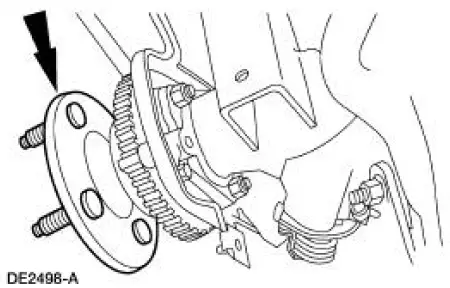
2. CAUTION: Do not damage the wheel bearing oil seal.
Install the two axle shafts.
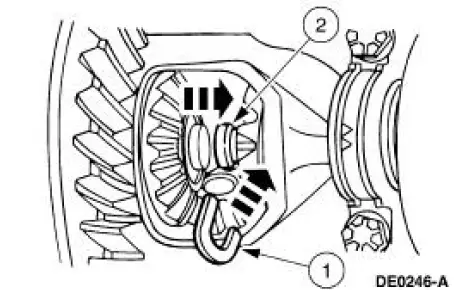
3. CAUTION: Do not damage the rubber O-ring in the axle shaft groove.
Install the U-washer.
1. Position the two U-washers on the button end of the axle shaft.
2. Pull the axle shaft outward.
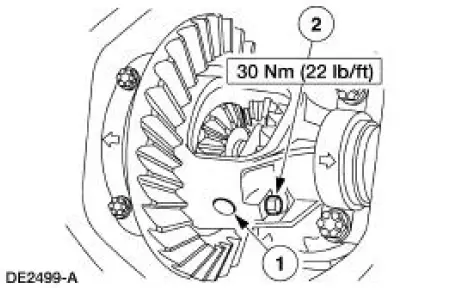
4. NOTE: If a new pinion shaft lock bolt is unavailable, coat the threads with Threadlock and Sealer EOAZ-19554-AA or equivalent meeting Ford specification WSK-M2G351-A5 prior to installation.
Install the differential pinion shaft.
1. Align the hole in the differential pinion shaft with the case lock bolt hole.
2. Install a new differential pinion shaft lock bolt.
5. Install the differential housing cover and fill the rear axle with the specified lubrication. For additional information, refer to Differential Housing Cover in this section.
6. Install the rear brake anti-lock sensor. .
7. Install the rear brakes. .
8. Install the tire and wheel assembly. 9. Lower the vehicle.
 Removal
1. Raise and support the vehicle.
2. Remove the wheel and tire assembly.
3. Remove the rear brake disc (2C026).
4. Remove the differential housing cover (4033) and drain the lubricant. For
addi ...
Other materials:
Sprockets
1. WARNING: To avoid the possibility of personal injury or damage
to the vehicle, do
not operate the engine with the hood open until the fan blade has been
examined for
possible cracks and separation.
NOTE: Specifications show the expected minimum or ma ...
Valve Tappets
Material
Removal
CAUTION: If removing more than one valve tappet, mark the
components removed for
correct location.
1. Remove the lower intake manifold. For additional information, refer to
Lower Intake Manifold in
this section.
2. Remove the push r ...
Adjusting the headlamps
The headlamps on your vehicle are properly aimed at the assembly plant.
If your vehicle has been in an accident, an authorized dealer should
check the alignment of your headlamps.
Vertical Aim Adjustment
1. Park the vehicle directly in front of a wall or scre ...
