
Ford Mustang (1999-2004) Service Manual: Parking Brake Cable Tension Release
1. CAUTION: If any component in the parking brake system requires repair or if the rear axle housing (4010) is removed, the cable tension must be released.
Place the parking brake control (2780) in the released position.
2. Remove the console.
3. With an assistant inside the vehicle, raise and support the vehicle.
4. Pull the parking brake cable and equalizer rearward.
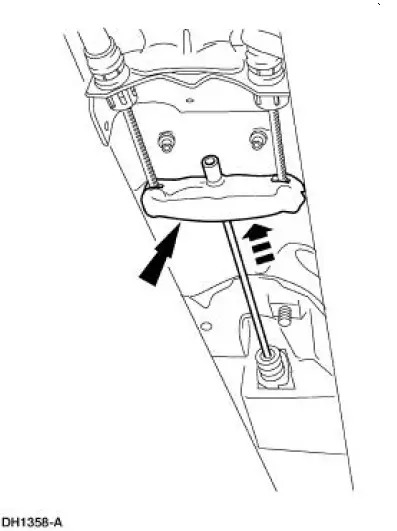
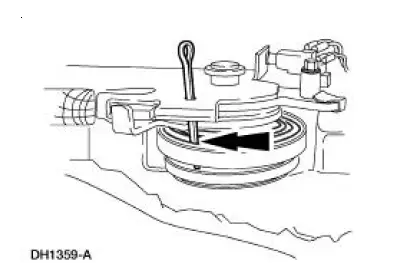
5. CAUTION: Do not remove the steel pin until the parking brake cable and equalizer/rear cable and conduits are connected to the parking brake control. Pin removal releases the tension in the ratchet wheel causing the spring to unwind and release tension.
Insert a steel pin through holes in the lever to the ratchet wheel.
 Parking Brake (Diagnosis and Testing)
Inspection and Verification
1. Verify the customer's concern by operating the parking brake system to
duplicate the condition.
2. Inspect to determine if one of the following mechanical or electrica ...
 Parking Brake Control
Removal
1. CAUTION: If any component in the parking brake system requires
repair or if the
rear axle housing (4010) is removed, the cable tension must be released.
Place the parking brake control (2 ...
Other materials:
Cable and Conduit
Removal
NOTE: The RH rear is shown, the LH is similar.
1. CAUTION: If any component in the parking brake system requires
repair or if the
rear axle housing (4010) is removed, the cable tension must be released.
Release the cable tension. For additional ...
Manual
WARNING: Brake fluid contains polyglycol ethers and polyglycols.
Avoid contact with
eyes. Wash hands thoroughly after handling. If brake fluid contacts
eyes, flush eyes with
running water for 15 minutes. Get medical attention if irritation
persist ...
Removal
WARNING: Always wear safety glasses when repairing an air bag
supplemental restraint
system (SRS) vehicle and when handling an air bag module. This will
reduce the risk of injury
in the event of an accidental deployment.
WARNING: Carry a live air ...
