
Ford Mustang (2005-2014) Owners Manual: Satellite radio information
Satellite Radio Channels
Sirius broadcasts a variety of music, news, sports, weather, traffic and entertainment satellite radio channels. For more information and a complete list of Sirius satellite radio channels, visit www.siriusxm.com in the United States, www.sirius.ca in Canada, or call Sirius at 1–888–539–7474.
Note: This receiver includes the eCos real-time operating system. eCos is published under the eCos License.
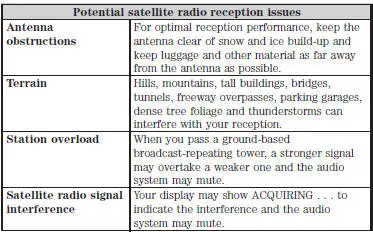
Satellite Radio Reception Factors
Sirius Satellite Radio Service
Note: Sirius reserves the unrestricted right to change, rearrange, add or delete programming including canceling, moving or adding particular channels, and its prices, at any time, with or without notice to you.
Ford Motor Company shall not be responsible for any such programming changes.
Sirius satellite radio is a subscription-based satellite radio service that broadcasts a variety of music, sports, news, weather, traffic and entertainment programming.
Your factory-installed Sirius satellite radio system includes hardware and a limited subscription term which begins on the date of sale or lease of your vehicle. See an authorized dealer for availability.
For more information on extended subscription terms (a service fee is required), the online media player and a complete list of Sirius satellite radio channels, and other features, please visit www.siriusxm.com in the United States, www.sirius.ca in Canada, or call Sirius at 1–888–539–7474.
Satellite Radio Electronic Serial Number (ESN)
You need your ESN to activate, modify or track your satellite radio account. When in satellite radio mode, you can view this number by pressing SIRIUS and memory preset 1 at the same time. To access your ESN, press the bottom left corner of the touchscreen, then SIRIUS > Options.
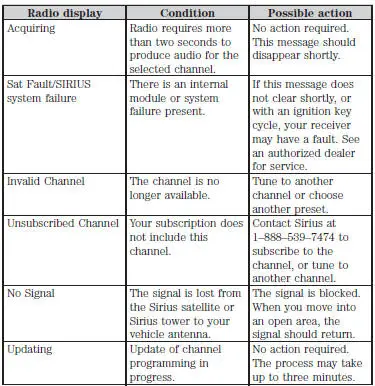
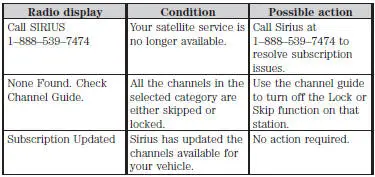
Troubleshooting
 AM/FM/CD/Sirius satellite radio
WARNING: Driving while distracted can result in loss of vehicle
control, crash and injury. We strongly recommend that you use
extreme caution when using any device that may take your focus off
the ro ...
 Auxiliary input jack
WARNING: Driving while distracted can result in loss of vehicle
control, crash and injury. We strongly recommend that you use
extreme caution when using any device that may take your focus off
the roa ...
Other materials:
Oil Level Indicator and Tube
Removal and Installation
1. Remove the oil level indicator.
2. Remove the LH exhaust manifold. For additional information, refer to Exhaust
Manifold LH in
this section.
3. Remove the bolt.
4. Remove the oil level indicator tube.
5. To install, reverse t ...
Pinpoint Tests
NOTE: Reinstall or install new evaporative emission hose clamps
removed or damaged during testing
procedures.
PINPOINT TEST A: DTC P0442 SMALL LEAK IN EVAP SYSTEM
Test Step
Result / Action to Take
NOTE: Condition P0442 DTC set: less than 0.62 ...
Valve Seals
Special Tool(s)
Valve Spring Compressor
303-452 (T93P-6565-AR)
Valve Stem Seal Replacer
303-383 (T91P-6571-A)
Compressor, Valve Spring
(Exhaust)
303-567 (T97P- 6565-AH)
Material
Item
Specification
Supe ...
