
Ford Mustang (2005-2014) Owners Manual: Steering Wheel
Adjusting the steering wheel
WARNING: Do not adjust the steering wheel when your vehicle is moving.
Note: Make sure that you are sitting in the correct position. See Sitting in the Correct Position in the Seats chapter.
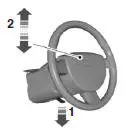
1. Unlock the steering column.
2. Adjust the steering wheel to the
desired position.
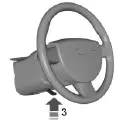
3. Lock the steering column.
AUDIO CONTROL (IF EQUIPPED)
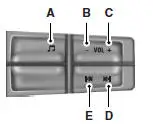
A. Media
B. Volume down
C. Volume up
D. Seek up or next
E. Seek down or previous
Press the media button repeatedly to scroll through available audio modes.
Press the seek buttons to select the next or previous stored preset or track. Press and hold to select the next or previous frequency or seek through a track.
VOICE CONTROL (IF EQUIPPED)
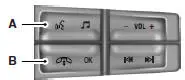
A. Voice recognition
B. Phone mode
See the SYNC or Navigation System chapter.
CRUISE CONTROL
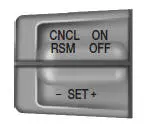
See the Cruise Control chapter.
INFORMATION DISPLAY CONTROL
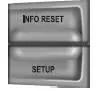
Type 1
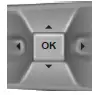
Type 2
See the Information Displays chapter.
 Anti-theft system
The active anti-theft system is designed to warn you in the event of
unauthorized vehicle entry and is also designed to help prevent
unwanted towing of the vehicle.
You can choose what is monitored b ...

Other materials:
General information on radio frequencies
This device complies with part 15 of the FCC Rules and with Industry
Canada license-exempt RSS standard(s). Operation is subject to the
following two conditions: (1) This device may not cause harmful
interference, and (2) This device must accept any interferen ...
Heated seats
WARNING: Persons who are unable to feel pain to the skin
because of advanced age, chronic illness, diabetes, spinal cord
injury, medication, alcohol use, exhaustion, or other physical conditions,
must exercise care when using the seat heater. The seat heater m ...
Pinpoint Tests
PINPOINT TEST P1464: DTC P1464: A/C DEMAND OUT OF SELFTEST
RANGE
Test Step
Result / Action to Take
P14641 RECHECK FOR THE DTC
YesGO to P14642 .
No
The system is functioning
correctly. This DTC will set if the
A/C is turned on when carryi ...
