
Ford Mustang (2005-2014) Owners Manual: Sound
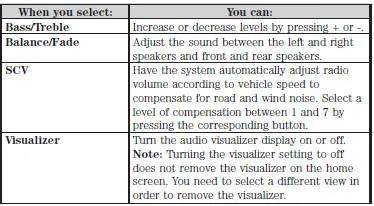
The sound menu allows you to access and adjust settings, such as Bass, Treble, Fade, Balance, Speed Compensated Volume (SCV) and the visualizer. Press the SOUND hard button.
 Information
Under the Information menu, you can access features such as Where Am
I? and Sirius Travel Link, view your calendar, see system information and
get basic system help.
Press the I (Information) hard bu ...
 Navigation system
Your navigation system allows you to set a destination by using your
touchscreen or voice commands.
The navigation system contains map coverage for the United States,
Puerto Rico and U.S. Virgin Isla ...
Other materials:
Torque Converter Leak Check
Special Tool(s)
Leak Tester, Torque Converter
307-421
1. Clean the outside surface of the torque converter.
2. Install the special tool into the converter hub.
3. WARNING: Always follow correct safety procedures while using press.
Failure t ...
Camshaft End Play - OHC Engines
Special Tool(s)
Dial Indicator Gauge with
Holding Fixture
100-002 (TOOL-4201-C) or
equivalent
1. Remove the roller followers. Refer to the appropriate section in Group 303
for the procedure.
2. Use a Dial Indicator Gauge with Holding Fixt ...
Cleaning the windows and wiper blades
The windows and wiper blades should be cleaned regularly. If the wipers
do not wipe properly, substances on the vehicle’s glass or the wiper
blades may be the cause. These may include hot wax treatments used by
commercial car washes, water repellent coatings ...
