
Ford Mustang (2005-2014) Owners Manual: Touchscreen climate controls
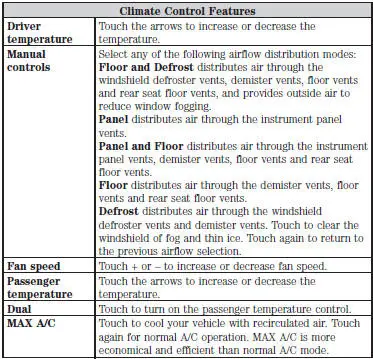
Press the CLIMATE hard button to access your climate control features.
Depending on your vehicle line and option package, your climate screen may look different from the screen shown here.
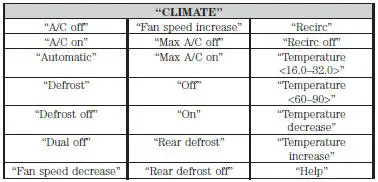
Climate Control Voice Commands

If you are not viewing the climate control screen, press the voice button and, after the tone, say “Climate�, then any of the commands in the following chart.
 Entertainment
Your system offers many media options. You can access these options
using the touchscreen or voice commands.
AM/FM Radio
Press the RADIO hard button.
To change between AM, FM1 and FM2, touch the AM ...
 Information
Under the Information menu, you can access features such as Where Am
I? and Sirius Travel Link, view your calendar, see system information and
get basic system help.
Press the I (Information) hard bu ...
Other materials:
Principles of Operation
The speed control system is designed to maintain vehicle speed above 48 km/h
(30 mph). After the
ON switch is depressed, depressing the SET/ACCEL switch will activate the speed
control servo. To
increase a set speed, either depress and hold for continuous ac ...
Installation
1. Apply silicone gasket and sealant in the locations shown.
2. Install the engine front cover.
3. Install the belt idler pulleys and the bolts.
4. Connect the CMP sensor electrical connector.
5. Raise the vehicle.
6. Install the crankshaft fr ...
Intake Air Distribution and Filtering
Torque Specifications
a - Refer to the procedure
Intake Air Distribution and Filtering (DESCRIPTION AND OPERATION)
The air intake system consists of the:
air intake scoop (Mach I)
air cleaner (ACL).
air cleaner (ACL) element.
mass air flow (MAF) s ...
