
Ford Mustang (1999-2004) Service Manual: Audio Unit (Removal and Installation)
Removal and Installation
1. Remove the instrument panel center finish panel. For additional information, refer to Section
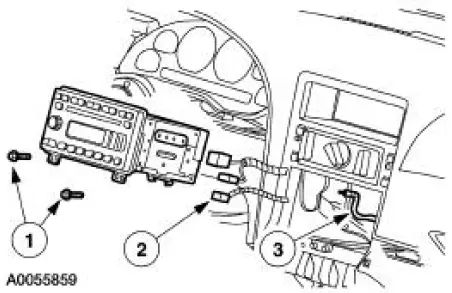
2. Remove the audio unit.
1. Remove the screws.
2. Disconnect electrical connectors.
3. Disconnect antenna cable.
3. To install, reverse the removal procedure.
 Audio Unit
Torque Specifications
Audio System
The Mustang is available with the following audio systems:
M100 CD AM/FM
CDX6-AM/FM with six CD in-dash
MP3 single CD AM/FM (optional)
The M100 s ...
 Subwoofer Amplifier - Convertible
Removal and Installation
1. NOTE: The convertible top needs to be in the up position to
remove the subwoofer amplifiers.
From inside the luggage compartment, remove the forward panel.
1. ...
Other materials:
Reverse Sun Gear
Disassembly
1. Remove the reverse clutch sun gear assembly and the No. 4 forward clutch
hub bearing and
race.
2. Remove the forward clutch sun gear assembly and the No. 5 forward clutch
sun gear bearing
and race.
Assembly
1. The forward clutch ...
Valve Springs
Special Tool(s)
Compressor, Valve Spring
303-163 (T81P-6513-A)
Material
Removal
1. Remove the LH and the RH valve covers. For additional information,
refer to Valve Cover-LH
and Valve Cover RH in this section.
2. Rotate the crankshaft un ...
Installation
1. Position the wiring harness:
Install the wiring harness retainer onto the LH valve cover stud bolt.
Install the wiring harness retainer into the power steering reservoir.
2. Connect the ECT sensor electrical connector.
3. Connect the CMP senso ...
