
Ford Mustang (1999-2004) Service Manual: Disassembly
1. Remove the driveshaft (4602). For additional information, refer to Driveshaft in this section.
2. CAUTION: Under no circumstances is the driveshaft assembly to be clamped in the jaws of a vise or similar holding fixture. Denting or localizing fracture can result, causing driveshaft failure during vehicle operation.
Place the driveshaft (4602) on a suitable workbench. Be careful not to damage the tube.
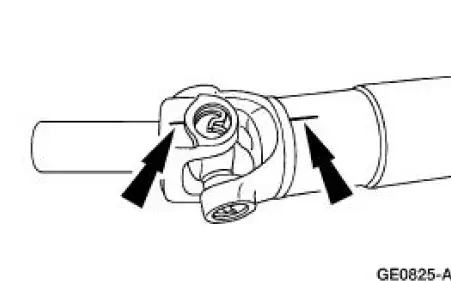
3. NOTE: If components are not marked and therefore installed incorrectly, driveline imbalance can occur.
Index-mark the driveshaft components.
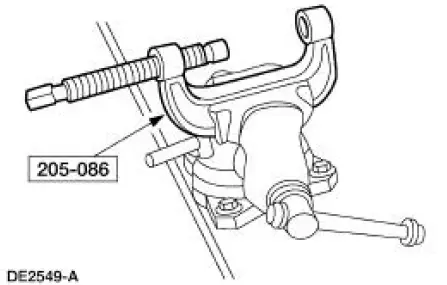
4. Clamp the special tool in a vise.
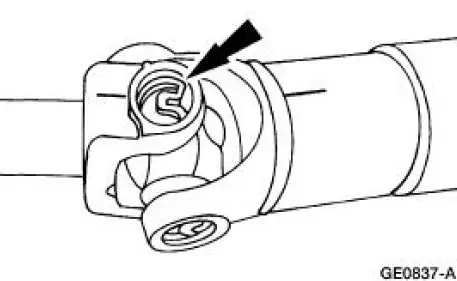
5. Remove all four of the snap rings.
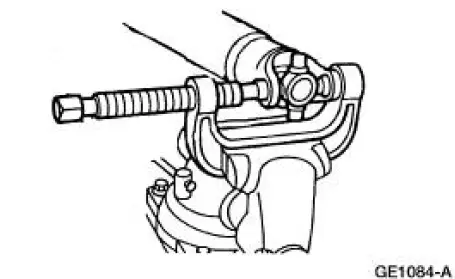
6. NOTE: If necessary, use a pair of pliers to remove a bearing cup if it cannot be pressed out all the way.
Remove the driveshaft slip yoke (4841).
1. Position the driveshaft slip yoke in the U-joint tool.
2. Press out a bearing cup.
3. Rotate the driveshaft slip yoke.
4. Press on the spider to remove the remaining bearing cup.
5. Remove the driveshaft slip yoke.
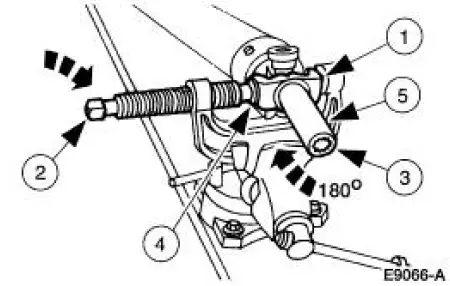
7. Repeat Step 5 to remove the remaining bearing cups and spider from the driveshaft.
8. Clean the yoke area at each end of the driveshaft.
 Driveshaft Slip Yoke
Special Tool(s)
Installer/Remover, C Frame
and Screw
205-086 (T74P-4635-C)
...
 Assembly
1. NOTE: Universal joint service kits are to be installed as complete
assemblies only. Do not mix
components from other U-joint kits.
Install the bearing cup.
1. Start a new bearing cup into the d ...
Other materials:
Driveshaft (Removal and Installation)
Material
Item
Specification
Threadlock and
Sealer
E0AZ-19554-AA
WSK-M2G351-A5 (type
II)
Removal and Installation
1. Raise and support the vehicle.
2. Carry out the following:
1. Place an index mark on the rear axle pinion flange and ...
Seats (Description and Operation)
Seats - Front Power
The front power seat features:
a six-way seat regulator control switch (14A701) located on the
front of the seat.
a seat track (61705) mounted under the seat.
a seat regulator motor (14547) and gear housing mounted on ...
Acceleration Control (Description and Operation)
Component Locations
The throttle is controlled by the accelerator cable which is connected to the
accelerator pedal and
shaft.
The accelerator pedal and shaft should travel smoothly from the idle to
the wide-open throttle
(WOT) positions. Hesi ...
