
Ford Mustang (1999-2004) Service Manual: Driveshaft (Description and Operation)
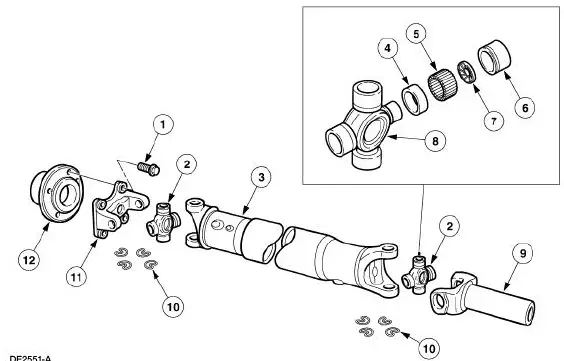
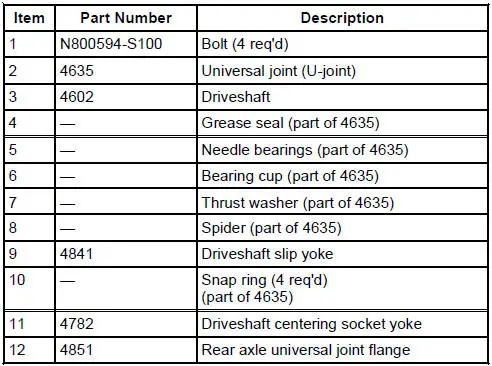
NOTE: All driveshaft assemblies are balanced. If undercoating the vehicle, protect the driveshaft to prevent overspray of any undercoating material.
The driveshaft has the following features:
- A tubular shaft used to transfer engine torque from the transmission output shaft to the differential in the rear axle housing, which transmits torque through the axle shafts to the drive wheels.
- Consists of two single-cardan universal joints, a driveshaft slip yoke, a welded tube assembly and a driveshaft centering socket yoke.
- The splined driveshaft slip yoke permits the driveshaft to move forward and rearward on the transmission output shaft during drivetrain movement and during driveshaft removal and installation.
 Driveshaft
Torque Specifications
Description
Nm
lb-ft
Pinion flange bolts
112
83
...
 Universal Joints
The universal joints are:
lubed-for-life design and require no lubrication.
equipped with nylon thrust washers, located at each base of the bearing
cup, which control end
play, position the need ...
Other materials:
Forward Clutch Cylinder
Special Tool(s)
Dial Indicator Gauge with
Holding Fixture
100-002 (TOOL-4201-C) or
equivalent
Compressor, Clutch Spring
307-096 (T81P-70235-A)
Protector, Transmission
Forward Clutch Outer Fluid
Seal
307-423
M ...
Engine Dynamic Balance Shaft
Removal
1. Remove the timing chain (6268). For additional information, refer to
Timing Chain in this
section.
2. Disconnect and position the wire harness aside.
3. Remove the radiator fan and shroud assembly (8146).
4. Remove the engine dynamic balan ...
Compressor Manifold and Tube Assembly - 4.6L
Material
Item
Specification
PAG Refrigerant Compressor
Oil (R-134a Systems)
F7AZ-19589-DA (Motorcraft YN-
12-C)
WSH-M1C231-
B
Removal and Installation
NOTE: Installation of a new suction accumulator is not required when
repairing the ...
