
Ford Mustang (1999-2004) Service Manual: Generator - 3.8L
Removal and Installation
1. Disconnect the battery (10655). For additional information, refer to Section.
2. Relieve the accessory drive belt (8620) tension and remove the belt from the generator pulley.
Leave the belt in place for reinstallation. For additional information, refer to Section.
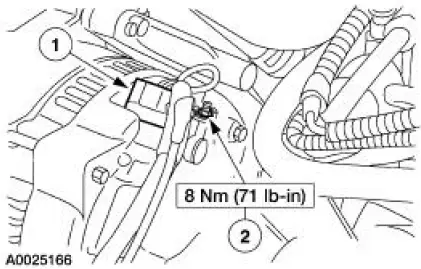
3. CAUTION: This is a new style connector that has a press-to-release tab. Pulling on the tab could result in damage to the connector or harness.
Disconnect the generator (10300).
1. Disconnect the generator electrical connectors.
2. Remove the battery positive cable nut.
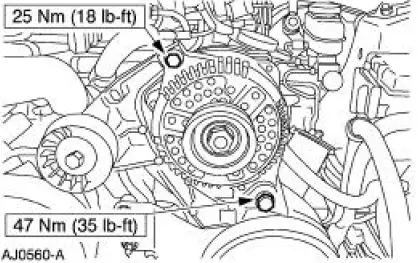
4. Remove the generator.
- Remove the upper and lower generator bolts.
5. To install, reverse the removal procedure.
 Generator and Regulator
General Specifications
Torque Specifications
Generator
The charging system consists of the:
generator (GEN)
internal voltage regulator
The generator has an internal voltage regulato ...
 Generator - 4.6L 2V
Removal and Installation
1. Disconnect the battery (10655). For additional information, refer
to Section.
2. Relieve the accessory drive belt (8620) tension and remove the belt
from the gen ...
Other materials:
Installation
1. CAUTION: The timing chain procedures must be followed exactly or
damage to the
valve and pistons will result.
Compress the tensioner plunger, using an edge of a vise.
2. While holding the ratchet mechanism, push the ratchet arm back into the
tensioner ...
Subwoofer Amplifier - Mach 1000
Removal and Installation
1. Remove the subwoofer assembly.
1. Remove the two attaching nuts.
2. Remove the screw.
3. Disconnect the electrical connectors.
2. Remove the subwoofer amplifiers.
Remove the bracket-to-body attaching nuts. ...
Gearshift Lever and Boot
Material
Removal and Installation
1. Remove the gearshift lever knob.
2. Remove the console panel gearshift plate. Lift the gearshift lever boot
over the gearshift lever.
3. Remove the bolts and the shift lever.
4. Remove the screws and the inner shif ...
