
Ford Mustang (1999-2004) Service Manual: Generator - 4.6L 2V
Removal and Installation
1. Disconnect the battery (10655). For additional information, refer to Section.
2. Relieve the accessory drive belt (8620) tension and remove the belt from the generator pulley.
Leave the belt in place for reinstallation. For additional information, refer to Section.
3. Remove the bolts on the upper generator bracket and remove the bracket.
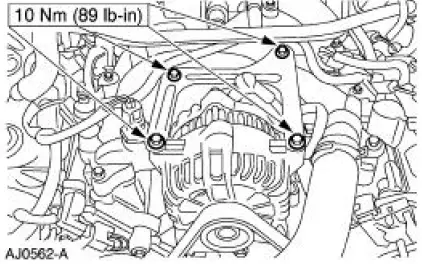
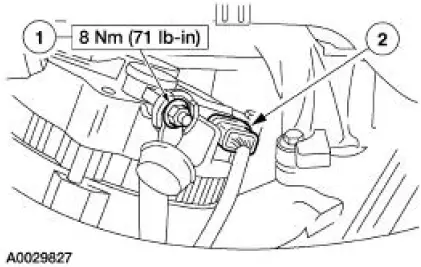
4. CAUTION: This is a new style connector that has a press-to-release tab. Pulling on the tab could result in damage to the connector or harness.
Disconnect the generator electrical connections.
1. Remove the battery positive cable nut (1) and cable.
2. Disconnect the generator electrical connector.
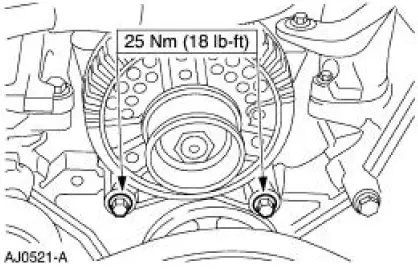
5. Remove the lower generator bolts and remove the generator.
6. To install, reverse the removal procedure.
 Generator - 3.8L
Removal and Installation
1. Disconnect the battery (10655). For additional information, refer
to Section.
2. Relieve the accessory drive belt (8620) tension and remove the belt
from the gen ...
 Generator - 4.6L 4V
Removal and Installation
1. Disconnect the battery. For additional information, refer to
Section.
2. Relieve the accessory drive belt tension and remove the belt from the
generator pulley.
...
Other materials:
Removal
CAUTION: Electronic modules are sensitive to static electrical
charges. If exposed to
these charges, damage may result.
1. Remove the driver air bag module. For additional information,
refer to Section.
2. Remove the passenger air bag module. For ...
Removal
1. Remove brake master cylinder filler cap (2162). Check brake fluid
level in brake master cylinder
reservoir (2K478). Remove fluid until brake master cylinder reservoir is
half full.
2. Raise and support the vehicle.
3. Remove the wheel and ...
Hydro-Boost Bleeding
1. NOTE: The Hydro-Boost power brake booster (2B560) is generally
self-bleeding, and the
following procedure will normally bleed the air from the power brake booster.
Normal operation
of the vehicle will further remove any additional trapped air.
Fill the p ...
