
Ford Mustang (2005-2014) Owners Manual: Information messages
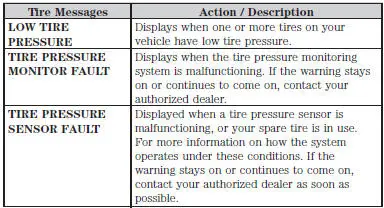
Note: Depending on the vehicle options equipped with your vehicle, not all of the messages will display or be available. Certain messages may be abbreviated or shortened depending upon which cluster type you have.
Press the RESET button for Type 1 displays or the OK button for Type 2 displays to acknowledge and remove some messages from the information display. Other messages will be removed automatically after a short time. Certain messages need to be confirmed before you can access the menus.
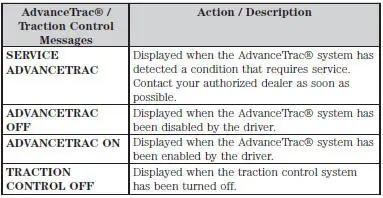
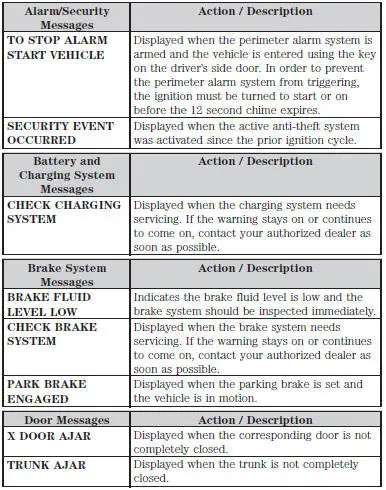
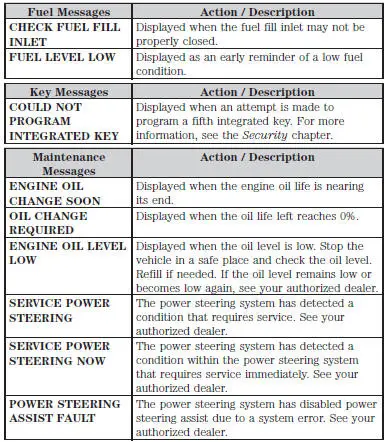
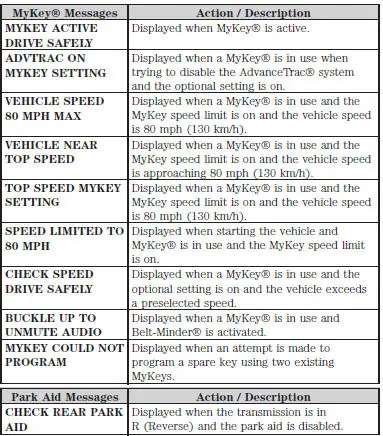
 General information
WARNING: Driving while distracted can result in loss of vehicle
control, accident and injury. Ford strongly recommends that drivers
use extreme caution when using any device or feature that may take t ...
 Electronic compass
The compass heading displays in the center-integrated display.
Note: Driving near large buildings, bridges, power lines and powerful
broadcast antenna may affect the compass reading. Magnetic or meta ...
Other materials:
Fuel Charging Wiring Harness
Removal and Installation
WARNING: Do not smoke or carry lighted tobacco or open flame of any
type when
working on or near any fuel related components. Highly flammable mixtures are
always present
and may ignite. Failure to follow these instructions may resul ...
Installation
1. Install the intake manifold and gaskets, tighten the bolts in the sequence
shown.
2. NOTE: The O-ring is to be installed on the top of the thermostat.
Install the water thermostat and the O-ring.
Install a new O-ring as necessary.
3. Install the wa ...
Sensor - Front
Removal
1. Remove the wheel and tire assembly.
2. Remove the inner fender splash shield.
1. Remove the inner fender splash shield push pins.
2. Remove the inner fender splash shield screw.
3. Remove the inner fender splash shield.
3. Remove the front ...
