
Ford Mustang (1999-2004) Service Manual: Supercharger Cooling System Flushing
1. WARNING: Never remove the pressure relief cap while the engine is operating or when the cooling system is hot. Failure to follow these instructions can result in damage to the cooling system or engine or personal injury. To avoid having scalding hot coolant or steam blow out of the degas bottle when removing the pressure relief cap, wait until the engine has cooled, then wrap a thick cloth around the pressure relief cap and turn it slowly. Step back while the pressure is released from the cooling system. when you are sure all the pressure has been released, (still with a cloth) turn and remove the pressure relief cap.
Once pressure is released, remove the pressure relief cap.
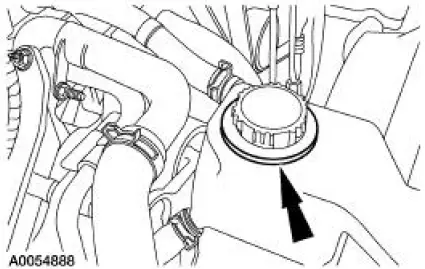
2. Drain the cooling system. For additional information, refer to Supercharger Cooling System Draining, Filling and Bleeding in this section.
3. NOTE: Refer to the cooling system flusher manufacturer's operating instructions for specific vehicle hook-up.
Using an appropriate cooling system flusher, flush the intercooler cooling system.
Use Premium Cooling System Flush VC-1 meeting Ford specification ESR-M14P7-A.
4. Fill the cooling system. For additional information, refer to Supercharger Cooling System Draining, Filling and Bleeding in this section.
 Supercharger Cooling System Draining, Filling and
Bleeding
Supercharger Cooling System Draining, Filling and
Bleeding
Draining
WARNING: Never remove the pressure relief cap while the engine is
operating or when the
cooling system is hot. Failure to follow these instructions can result in damage
to the cooling
syste ...
 Water Pump
Removal and Installation
1. Disconnect the battery ground cable.
2. Drain the coolant. For additional information, refer to Supercharger Cooling
System Draining,
Filling and Bleeding in this section ...
Other materials:
Disassembly
Main Control Valve Body - Disassembled View
1. Remove the torque converter clutch (TCC) solenoid and the shift solenoid.
1. Remove the bolt.
2. Remove the shift solenoid.
3. Remove the TCC solenoid.
2. Remove the two reinforcement plate ...
Air Conditioning (A/C) System Check - Retail Procedure
NOTE: This Retail Procedure is not eligible for claiming on Ford
paid repairs (warranty and ESP).
NOTE: The engine should be run at idle for 10 minutes with the air
conditioning on and set to MAX A/C
before carrying out this retail procedure.
NOTE: Re ...
Camshaft
Material
Removal
1. Remove the valve tappets. For additional information, refer to Valve
Tappets in this section.
2. Remove the timing chain. For additional information, refer to Timing
Chain in this section.
3. Position the wire harness aside.
4. R ...
