
Ford Mustang (2005-2014) Owners Manual: Autolamps
WARNING: In severe weather conditions, it may be necessary to switch your headlamps on manually.
Note: If the vehicle is equipped with autolamps, it will have the windshield wiper rainlamp feature. When the windshield wipers are turned to low- or high-speed wiping during daylight, and the headlamp control is in the autolamp position, the exterior lamps will turn on after a brief delay and will remain on until the wipers are turned off.
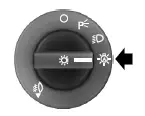
The autolamp system provides light sensitive automatic on-off control of the exterior lights normally controlled by the headlamp control.
The headlamps will remain on for a period of time after you switch the ignition off. You can adjust the time delay using the display controls in the instrument cluster. See the Information Displays chapter.
 Lighting control
A. Off
B. Parking lamps, instrument panel
lamps, license plate lamps and tail
lamps
C. Headlamps
High Beams
• Push the lever toward the
instrument panel to switch
on the high beams.
• Pull the l ...
 Instrument lighting dimmer
• Move the control up or down to
adjust the intensity of the panel
lighting.
• Move the control to the full
upright position, past detent,
to turn on the interior lamps.
• Move the control down ...
Other materials:
Diagnostic Strategy
Troubleshooting an electronically controlled automatic transmission
is simplified by using the proven
method of diagnosis. One of the most important things to remember is
that there is a definite
procedure to follow.
NOTE: Do not take any short cut ...
Accelerator Cable - Supercharged Engine
Removal and Installation
1. Push the accelerator cable nylon bushing out of the accelerator pedal and
shaft arm.
2. Disconnect the accelerator cable from the throttle cam.
3. Depress the tabs and disconnect the accelerator cable from the bracket.
4. Rel ...
Creating a MyKey
Use the information display to create a MyKey.
For Type 1 information displays:
1. Insert the key you want to program into the ignition.
2. Switch the ignition on.
3. Access the main menu within the information display, and press
SETUP using the information d ...
