
Ford Mustang (2005-2014) Owners Manual: Cruise Control
PRINCIPLES OF OPERATION
Cruise control lets you maintain a set speed without keeping your foot on the accelerator pedal.
USING CRUISE CONTROL
WARNING: Do not use cruise control in heavy traffic, on winding roads or when the road surface is slippery. This could result in loss of vehicle control, serious injury or death.
WARNING: When you are going downhill, your vehicle speed may increase above the set speed. The system will not apply the brakes. Change down a gear to assist the system in maintaining the set speed. Failure to do so could result in loss of vehicle control, serious injury or death.
Note: Cruise control will disengage if your vehicle speed decreases more than 10 mph (16 km/h) below your set speed while driving uphill.
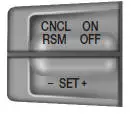
The cruise controls are located on the steering wheel.
Switching Cruise Control On
Press and release ON.

The indicator will appear in the instrument cluster.
Setting a Speed
1. Accelerate to the desired speed.
2. Press and release SET+.
3. Take your foot off the accelerator pedal.
The indicator will change colors in the instrument cluster.
Changing the Set Speed
Note: If you accelerate by pressing the accelerator pedal, the set speed will not change. When you release the accelerator pedal, you will return to the speed that you previously set.
• Press and hold SET+ or SET-. Release the control when you reach
the desired speed.
• Press and release SET+ or SET-. The set speed will change in
approximately 1 mph (2 km/h) increments.
• Press the accelerator or brake pedal until you reach the desired
speed. Press and release SET+.
Canceling the Set Speed
Press CNCL or tap the brake pedal. You will not erase the set speed.
Resuming the Set Speed
Press and release RSM.
Switching Cruise Control Off
Note: You will erase the set speed if you switch the system off.
Press and release OFF or switch the ignition off.
 Rear-view camera system
WARNING: The rear view camera system is a reverse aid
supplement device that still requires the driver to use it in
conjunction with the interior and exterior mirrors for maximum
coverage.
WARNING: Ob ...
 Driving Aids
STEERING
Electric Power Steering
WARNING: The electric power steering system has diagnostic
checks that continuously monitor the system to ensure proper
operation. When a system error is detected a st ...
Other materials:
Runout Check - Brake Disc and Hub
Special Tool(s)
Brake Measurement Kit
134-R0199 or equivalent
Material
Item
Specification
High Temperature Nickel Anti-
Seize Lubricant
F6AZ-9L494-AA
ESE-M12A4-
A
CAUTION: The brake disc (1126) runout specification must ...
Supplementary Restraints System
PRINCIPLES OF OPERATION
WARNING: Airbags do not inflate slowly or gently, and the risk
of injury from a deploying airbag is the greatest close to the trim
covering the airbag module.
WARNING: All occupants of your vehicle, including the driver,
should always p ...
Pump - CII
Special Tool(s)
Teflon Seal Replacer Set
211D027 (D90P-3517-A) or
equivalent
Removal and Installation
1. Disconnect the power steering hose. Remove and discard the seal ring.
2. Disconnect the power steering hose.
3. Remove the pulley.
...
