
Ford Mustang (2005-2014) Owners Manual: System menu features
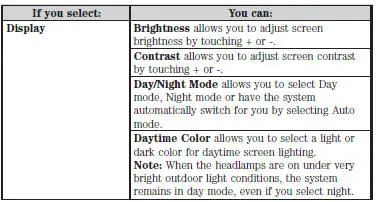
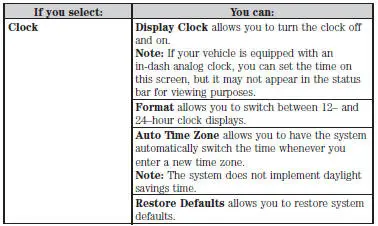
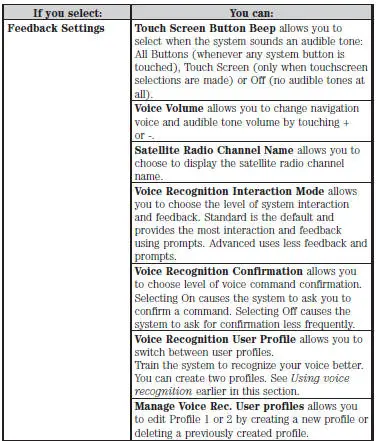
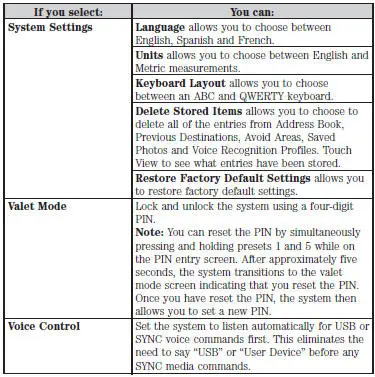
Your system offers many menu features, such as allowing you to adjust the touchscreen brightness, time and language, feedback and system settings. You can access these options by pressing the MENU hard button.
 Entertainment
Your system offers many media options. You can access these options
using the touchscreen or voice commands.
AM/FM Radio
Press the RADIO hard button.
To change between AM, FM1 and FM2, touch the AM ...
Other materials:
Removal
1. Remove brake master cylinder filler cap (2162). Check brake fluid
level in brake master cylinder
reservoir (2K478). Remove fluid until brake master cylinder reservoir is
half full.
2. Raise and support the vehicle.
3. Remove the wheel and ...
Installation
1. Install the upper intake manifold gasket.
2. Install the intake manifold and bolts in the sequence shown.
3. Install the PCV valve-to-intake manifold tube.
4. Connect the vacuum hoses and the electrical connector to the EGR vacuum
regulator soleno ...
Hydraulic Control Unit
Removal
1. Disconnect the battery ground cable(14301).
2. Disconnect the anti-lock-brake control module electrical connector.
3. NOTE: The 4 wheel anti-lock brake system (4WABS) with traction
control is shown , the
4WABS without traction control system is ...
