
Ford Mustang (2005-2014) Owners Manual: Technical specifications
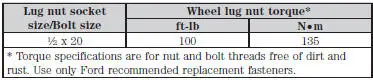
Wheel Lug Nut Torque Specifications
WARNING: When a wheel is installed, always remove any corrosion, dirt or foreign materials present on the mounting surfaces of the wheel or the surface of the wheel hub, brake drum or brake disc that contacts the wheel. Make sure that any fasteners that attach the rotor to the hub are secured so they do not interfere with the mounting surfaces of the wheel. Installing wheels without correct metal-to-metal contact at the wheel mounting surfaces can cause the wheel nuts to loosen and the wheel to come off while your vehicle is in motion, resulting in loss of control.
Retighten the lug nuts to the specified torque within 100 miles (160 kilometers) after any wheel disturbance (such as rotation, flat tire, wheel removal).
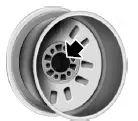
Note: Inspect the wheel pilot hole and mounting surface prior to installation. Remove any visible corrosion or loose particles.
 Temporary mobility kit
Note: The temporary mobility kit sealant compound in the canister is
to
be used for one tire only. See your Ford authorized dealer for additional
replacement sealant canisters.
The kit is located in ...

Other materials:
Installation
1. Lubricate the lip of the wheel bearing oil seal
Use Premium Long-Life Grease XG-1-C or equivalent meeting Ford
specification ESAM1C75-
B.
2. CAUTION: Do not damage the wheel bearing oil seal.
Install the two axle shafts.
3. CAUTION: Do not damage th ...
Getting the services you need
Warranty repairs to your vehicle must be performed by an authorized
dealer. While any authorized dealer handling your vehicle line will
provide warranty service, we recommend you return to your selling
authorized dealer who wants to ensure your continued satis ...
Electronic Engine Controls - Cobra
Most of the Cobra engine electronic controls are similar to that of
the non-supercharged 4.6L (2V)
engine. These components are as follows:
Crankshaft position (CKP) sensor
Throttle position (TP) sensor
Idle air control (IAC) valve
Mass air ...
