
Ford Mustang (2005-2014) Owners Manual: Sound
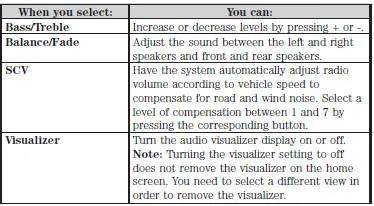
The sound menu allows you to access and adjust settings, such as Bass, Treble, Fade, Balance, Speed Compensated Volume (SCV) and the visualizer. Press the SOUND hard button.
 Information
Under the Information menu, you can access features such as Where Am
I? and Sirius Travel Link, view your calendar, see system information and
get basic system help.
Press the I (Information) hard bu ...
 Navigation system
Your navigation system allows you to set a destination by using your
touchscreen or voice commands.
The navigation system contains map coverage for the United States,
Puerto Rico and U.S. Virgin Isla ...
Other materials:
Fuel Injectors
Material
Item
Specification
SAE 5W-20 Premium Synthetic
Blend Motor Oil
XO-5W20-QSP or equivalent
WSS-M2C153-
H
Removal and Installation
WARNING: Do not smoke or carry lighted tobacco or open flame of any
type when
working on or near ...
Assembly
1. Install the valve stem seals.
2. Install the valves and the valve springs.
3. CAUTION: Make sure the tool is seated correctly on the valve spring.
Apply a small
amount of air at a time. This will prevent the tool from shifting and causing
damage to
the ...
Appendices
GENERAL INFORMATION
SYNC® End User License Agreement (EULA)
• You have acquired a device (“DEVICE�) that includes software
licensed by FORD MOTOR COMPANY from an affiliate of Microsoft
Corporation (“MS�). Those installed software products of MS orig ...
