
Ford Mustang (1999-2004) Service Manual: Switch - Window Regulator Control
Removal
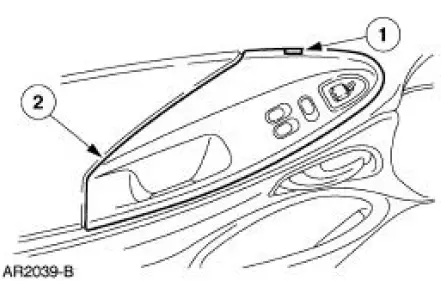
1. CAUTION: Use a shop towel or similar material between the tool and the door trim panel or damage to the door trim panel may occur.
Position the window regulator switch plate aside.
1. Pull at the service notch.
2. Lift to release the clip at the rear edge.
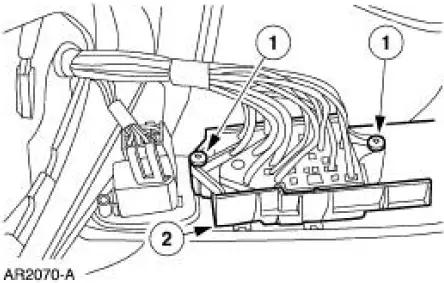
2. Remove the window regulator control switch.
1. Remove the screws.
2. Disconnect the connectors.
Installation
1. To install, reverse the removal procedure.
Rear Window Defrost Switch
Removal and Installation
1. Remove the instrument panel center finish panel. For additional information, refer to Section.
2. Release the clips and remove the rear window defrost switch.
3. To install, reverse the removal procedure.
 Door Window Glass Adjustment - Height Stop Adjustment
1. Close the front door.
2. Loosen the screws.
3. Raise the door window glass to the desired height.
4. Tighten the screws.
Door Window Glass Adjustment -Stabilizer
1. Raise the door window ...
 Rear Window Glass
Special Tool(s)
Rotunda Pneumatic Knife with
Offset Blade
107-R1511 or equivalent
The Pumper
164-R2459 or equivalent
Rotunda Interior Auto Glass
Cut-Out Knif ...
Other materials:
Exhaust Manifold - LH
Removal
1. Raise and support the vehicle. For additional information, refer to
Section.
2. Remove the LH exhaust manifold flange nuts.
3. Remove the RH exhaust manifold flange nuts.
4. Lower the vehicle.
5. NOTE: Discard the exhaust manifold gasket.
...
Personal Safety System
The Personal Safety System provides an improved overall level of frontal
crash protection to front seat occupants and is designed to help further
reduce the risk of airbag-related injuries. The system is able to analyze
different occupant conditions and crash ...
Hydraulic Control Unit
Removal
1. Disconnect the battery ground cable(14301).
2. Disconnect the anti-lock-brake control module electrical connector.
3. NOTE: The 4 wheel anti-lock brake system (4WABS) with traction
control is shown , the
4WABS without traction control system is ...
