
Ford Mustang (2005-2014) Owners Manual: SYNC®
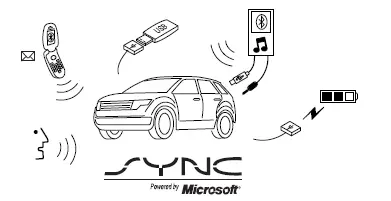
SYNC is an in-vehicle communications system that works with your Bluetooth-enabled cellular phone and portable media player. This allows you to:
• Make and receive calls.
• Access and play music from your portable music player.
• Use 911 Assist, Vehicle Health Report and SYNC Services (Traffic,
Directions & Information) (if equipped).
• Use applications, such as Pandora and Stitcher, via SYNC AppLink™
(if applicable).
• Access phonebook contacts and music via voice commands.
• Stream music from your connected phone.
• Text message.
• Use the advanced voice recognition system.
• USB device charging (if your device supports this).
- General information
- Using voice recognition
- Using sync with your phone
- Sync applications and services (if equipped)
- 911 Assistâ„¢
- Using sync with your media player
- Troubleshooting
 USB port
WARNING: Driving while distracted can result in loss of vehicle
control, crash and injury. We strongly recommend that you use
extreme caution when using any device that may take your focus off
the roa ...
 General information
Make sure you review your device’s manual before using it with SYNC.
Support
The SYNC support team is available to help you with any questions you
cannot answer on your own.
Monday-Saturday, 8:30a ...
Other materials:
Component Test
Carry out the appropriate Functional Test(s) as determined in Inspection and
Verification.
Functional Test I (Buckle and Tongue)
The safety belt buckle and tongue assembly must operate freely during the
latching and unlatching
function. Fasten the safety bel ...
1-2 Accumulator
Removal
1. Compress the 1-2 accumulator cover and remove the accumulator piston
retaining ring.
2. NOTE: Note the location of the 1-2 accumulator springs for
reference during assembly.
Remove the 1-2 accumulator.
1. Remove the 1-2 accumulator cover.
2. ...
Removal
Convertible
1. For removal of the back window glass, refer to Section.
Coupe
WARNING: To prevent glass splinters from entering eyes or
cutting hands, wear safety
glasses and heavy gloves when cutting glass from the vehicle.
2. Remove the roof side ...
