
Ford Mustang (2005-2014) Owners Manual: USB port
WARNING: Driving while distracted can result in loss of vehicle control, crash and injury. We strongly recommend that you use extreme caution when using any device that may take your focus off the road. Your primary responsibility is the safe operation of your vehicle. We recommend against the use of any hand-held device while driving and encourage the use of voice-operated systems when possible.
Make sure you are aware of all applicable local laws that may affect the use of electronic devices while driving.
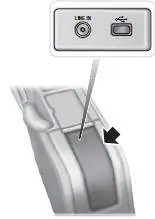
The USB port allows you to plug in media playing devices, memory sticks and charge devices (if supported). See the SYNC chapter for more information.
There is a notch on the side of the console as indicated. To prevent the console lid from crushing the cable, route the cable through the notch.
 Auxiliary input jack
WARNING: Driving while distracted can result in loss of vehicle
control, crash and injury. We strongly recommend that you use
extreme caution when using any device that may take your focus off
the roa ...
 SYNC®
SYNC®
SYNC is an in-vehicle communications system that works with your
Bluetooth-enabled cellular phone and portable media player. This allows
you to:
• Make and receive calls.
• Access and play music ...
Other materials:
Ignition Switch
Removal
1. Disconnect the battery ground cable.
2. Remove the lower instrument panel steering column cover.
1. Remove the screws.
2. Remove the lower instrument panel steering column cover.
3. Remove the instrument panel reinforcement.
1. Rem ...
Supercharger Belt Idler Pulley
Removal and Installation
1. Remove the supercharger drive belt cover.
2. Rotate the supercharger belt tensioner clockwise and remove the
supercharger belt.
3. Remove the bolt and the supercharger belt idler pulley.
4. To install, reverse the removal pro ...
Resistor
Removal
1. Disconnect the connector.
2. Remove the screws.
3. Remove the resistor.
Installation
1. To install, reverse the removal procedure. ...
