
Ford Mustang (2005-2014) Owners Manual: Troubleshooting
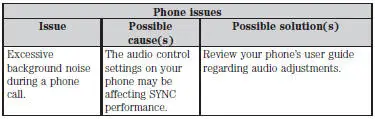
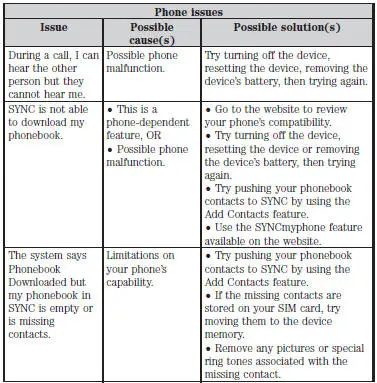
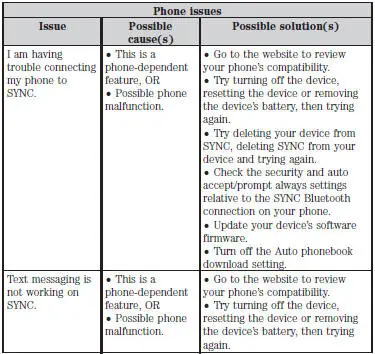
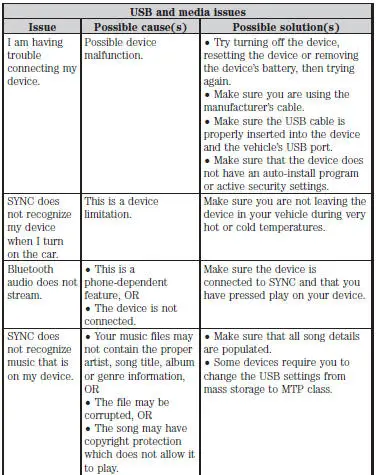
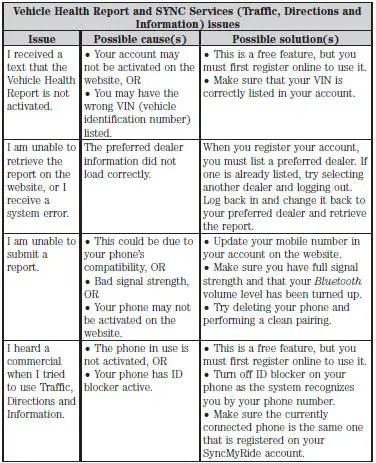
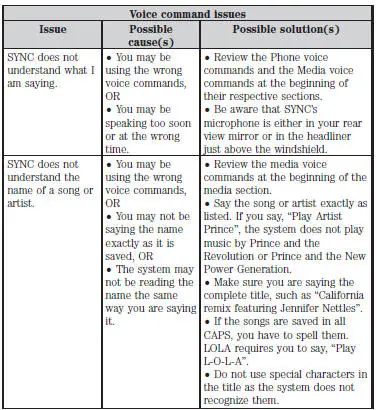
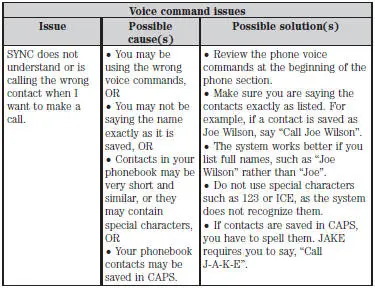
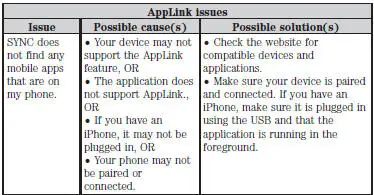
Your SYNC system is easy to use. However, should questions arise, see the tables below.
Use the website at any time to check your phone’s compatibility, register your account and set preferences as well as access a customer representative via an online chat (during certain hours).
Visit www.SYNCMyRide.com, www.SYNCMyRide.ca or www.syncmaroute.ca for more information.
 Using sync with your media player
You can access and play music from your digital music player over
the vehicle’s speaker system using the system’s media menu or voice
commands. You can also sort and play your music by specific ca ...

Other materials:
Module Communications Network
General Specifications
Communications Network
Module Communications Network
...
Pump - CII
Special Tool(s)
Teflon Seal Replacer Set
211D027 (D90P-3517-A) or
equivalent
Removal and Installation
1. Disconnect the power steering hose. Remove and discard the seal ring.
2. Disconnect the power steering hose.
3. Remove the pulley.
...
Vibrate Software
Vibrate Software (Rotunda tool number 215-00003) is a diagnostic aid which
will assist in pinpointing
the source of unacceptable vibrations. The engine's crankshaft is the point of
reference for vibration
diagnosis. Every rotating component will have an angu ...
