
Ford Mustang (1999-2004) Service Manual: Accelerator Cable Bracket - 4.6L (2V)
Removal and Installation
1. Disconnect the speed control cable from the throttle body and the bracket. For additional information, refer to Section.
2. Disconnect the accelerator cable from the throttle body by rotating the throttle body full open and aligning the cable with the release slot.
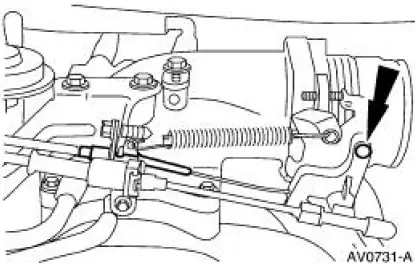
3. Compress the accelerator cable locking tabs and disconnect the accelerator cable from the accelerator cable bracket.
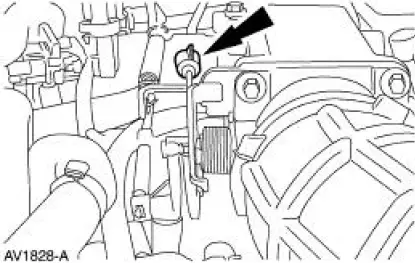
4. Remove the spring.
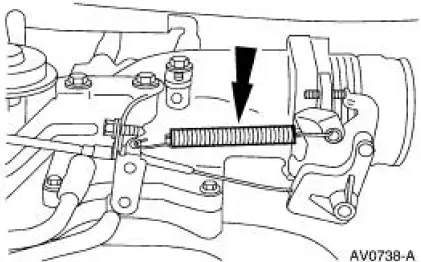
5. Remove the bolts and the accelerator cable bracket.
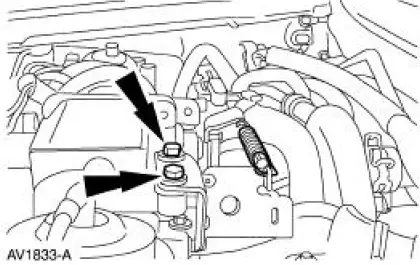
6. To install, reverse the removal procedure.
 Accelerator Cable Bracket - 3.8L
Removal and Installation
1. Disconnect the speed control cable from the throttle body and the bracket.
For additional
information, refer to Section.
2. Disconnect the accelerator cable from the thro ...
 Accelerator Cable Bracket - Supercharged Engine
Removal and Installation
1. Disconnect the accelerator cable and speed control cable.
2. Depress the tabs and disconnect the accelerator cable and speed control
cable from the
accelerator cable bra ...
Other materials:
Air Bag Disposal - Undeployed Inoperative
WARNING: Always wear safety glasses when repairing an air bag
supplemental restraint
system (SRS) vehicle and when handling an air bag module. This will
reduce the risk of injury
in the event of an accidental deployment.
WARNING: Never probe the c ...
Symptom Chart
Condition
Possible Sources
Action
Difficult
starting
Damaged ignition
system.
Damaged fuel
system.
Damaged starting
system.
Damaged charging
system/battery.
Burnt valve.
Worn piston.
Worn pi ...
Cleaning the exterior
Wash your vehicle regularly with cool or lukewarm water and a neutral
pH shampoo, such as Motorcraft® Detail Wash.
• Do not use a commercial or high-pressure wand on the surface or
edge of stripes and graphics. This can cause damage to the film and
cause th ...
