
Ford Mustang (1999-2004) Service Manual: Accelerator Cable Bracket - 3.8L
Removal and Installation
1. Disconnect the speed control cable from the throttle body and the bracket. For additional information, refer to Section.
2. Disconnect the accelerator cable from the throttle body by rotating the throttle body full open and aligning the cable with the release slot.
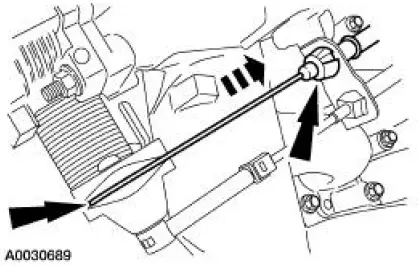
3. Compress the accelerator cable locking tabs and disconnect the accelerator cable from the accelerator cable bracket.
4. Remove the bolts and the accelerator cable bracket.
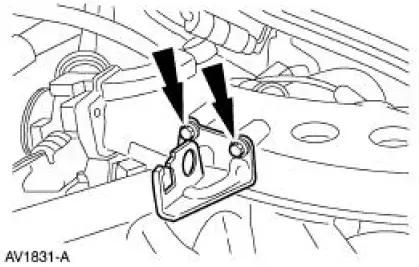
5. To install, reverse the removal procedure.
 Accelerator Cable - Supercharged Engine
Removal and Installation
1. Push the accelerator cable nylon bushing out of the accelerator pedal and
shaft arm.
2. Disconnect the accelerator cable from the throttle cam.
3. Depress the tabs and ...
 Accelerator Cable Bracket - 4.6L (2V)
Removal and Installation
1. Disconnect the speed control cable from the throttle body and the bracket.
For additional
information, refer to Section.
2. Disconnect the accelerator cable from the thro ...
Other materials:
Muffler - 4.6L (4V)
Removal and Installation
1. Raise and support the vehicle. For additional information, refer to
Section.
2. NOTE: RH side shown, LH side similar.
Remove the dual converter assembly nuts.
3. Remove the RH exhaust hanger insulator (5260).
4. Remove the LH ...
Assembly
All steering gears
1. Install the steering gear in the special tools.
Steering gears equipped with travel restrictors
2. Install the travel restrictors.
Install new travel restrictors as necessary.
All steering gears
3. CAUTION: Place the steering gear at t ...
Instrument Cluster and Panel Illumination
The instrument cluster and panel illumination system illuminates the
following components:
instrument cluster (10849)
audio unit (18806)
A/C-heater control
fog lamp switch
transmission range indicator
traction control switch
rear window defrost contro ...
