
Ford Mustang (1999-2004) Service Manual: Accessory Drive Belt - 4.6L (2V) and (4V)
Removal and Installation
Mach I
1. Remove the air intake scoop. For additional information, refer to Section.
Cobra
2. Remove the supercharger drive belt cover.
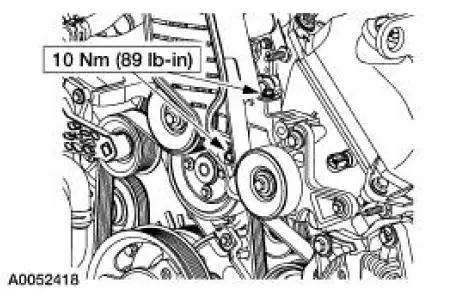
3. Rotate the supercharger belt tensioner clockwise and remove the supercharger belt.
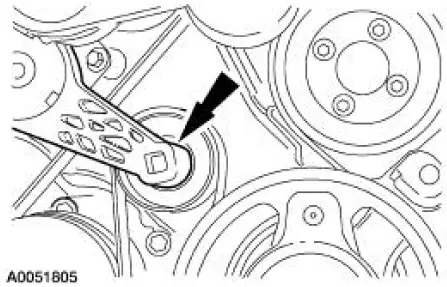
4. Remove the coolant hose mounting bolt.
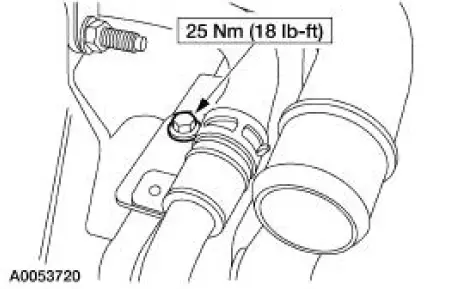
5. Remove the belt idler support bracket assembly.
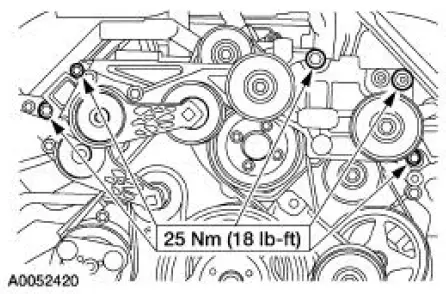
6. Remove auxiliary crankshaft pulley. For additional information, refer to Section.
All engines
7. Rotate the belt tensioner and remove the accessory drive belt.
8. NOTE: Make sure the accessory drive belt is correctly installed on each pulley.
To install, reverse the removal procedure.
- Refer to Accessory Drive and Accessory Drive-Cobra for accessory drive belt routing.
 Accessory Drive Belt - 3.8L
Removal and Installation
1. Rotate the drive belt tensioner counterclockwise and remove the drive
belt.
2. NOTE: Make sure the drive belt is correctly installed on each
pulley.
To install, reverse ...
 Supercharger Belt
Removal and Installation
1. Remove the supercharger drive belt cover.
2. Rotate the supercharger belt tensioner clockwise and remove the
supercharger belt.
3. To install, reverse the removal proc ...
Other materials:
Antenna
Torque Specifications
Antenna
The antenna system consists of:
antenna mast
antenna base and cable
antenna lead-in cable
The radio antenna uses a two-piece coaxial cable to connect the audio
unit to the antenna. The front
antenna lead-i ...
Installation
Using special tool 205-024
NOTE: This is the preferred method for installing the pinion bearing
cups. If necessary, proceed to
Using special tools 205-153, 205-024, 205-231, and 205-D055 in this procedure
for an alternate
method.
1. Position the special too ...
Child Safety Seat Belt - Tether Anchor
Removal and Installation
Hard top only
1. Remove the package tray. For additional information, refer to Section.
2. Remove the bolts and the tether anchor bracket.
Convertible only
3. NOTE: Rework the sheet metal to its original condition and structural
in ...
