
Ford Mustang (1999-2004) Service Manual: Actuator Cable - Speed Control-Cobra
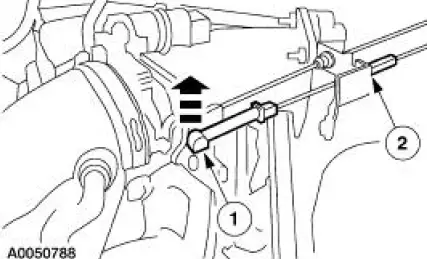
1. Remove the speed control actuator cable end from the throttle body.
1. Lift the speed control cable from the throttle nailhead.
2. Release the speed control cable from the throttle bracket.
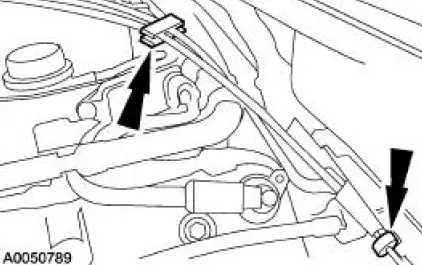
2. Remove the speed control cable from the retaining clips.
3. Remove the LH front wheel and tire assembly. For additional information, refer to Section
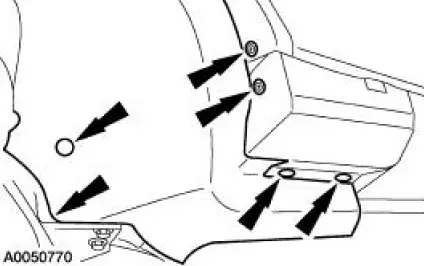
4. Position aside the LH front splash shield.
- Remove the pin-type retainers.
- Remove the screws.
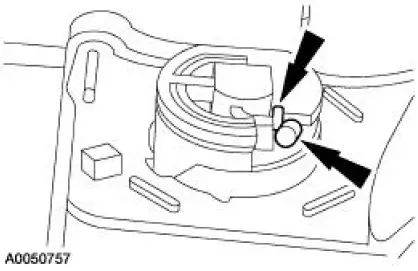
5. Depress the locking tab and rotate the speed control actuator cable cap to remove.
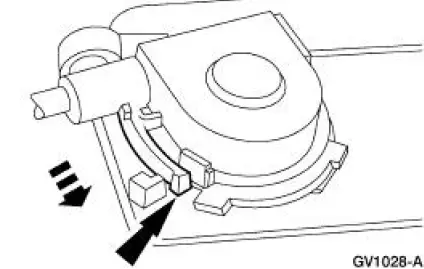
6. Gently push in the retaining spring while disconnecting the speed control actuator cable from the speed control actuator pulley.
Installation
1. To install, reverse the removal procedure.
 Actuator Cable - Speed Control
1. Remove the speed control actuator cable end from the throttle body.
1. Lift the speed control cable from the throttle nailhead.
2. Release the speed control cable from the throttle bracket.
...
 Actuator - Speed Control Servo
1. CAUTION: Electronic modules are sensitive to static electrical
charges. If exposed
to these charges, damage may result.
Disconnect the battery ground cable.
2. Remove the LH wheel and tire; re ...
Other materials:
Inspection and Verification
Certain axle noise or vibration symptoms are also common to the engine,
transmission, wheel
bearings, tires, and other parts of the vehicle. For this reason, be sure that
the cause of the trouble is
in the axle before disassembling, adjusting or repairing th ...
Camshaft Position (CMP) Sensor - 3.8L
Removal
1. Disconnect the battery ground cable. For additional information,
refer to Section.
2. Remove the camshaft position (CMP) sensor.
Disconnect the connector.
Remove the bolts and the sensor.
Installation
1. To install, reverse t ...
Oil Pan
Special Tool(s)
Compressor, Coil Spring
204-D001 (D78P-5310-A)
Lifting Bracket, Engine
303-D088 (D93P-6001-A2)
3-Bar Engine Support Kit
303-F072
Material
Item
Specification
Metal Surface Cleaner
F4 ...
