
Ford Mustang (1999-2004) Service Manual: Audio Unit (Removal and Installation)
Removal and Installation
1. Remove the instrument panel center finish panel. For additional information, refer to Section
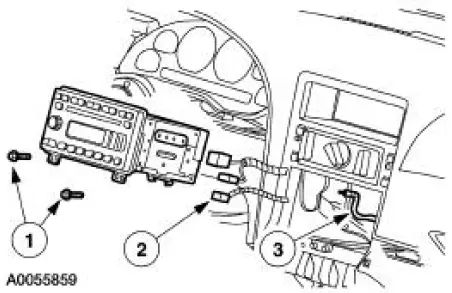
2. Remove the audio unit.
1. Remove the screws.
2. Disconnect electrical connectors.
3. Disconnect antenna cable.
3. To install, reverse the removal procedure.
 Audio Unit
Torque Specifications
Audio System
The Mustang is available with the following audio systems:
M100 CD AM/FM
CDX6-AM/FM with six CD in-dash
MP3 single CD AM/FM (optional)
The M100 s ...
 Subwoofer Amplifier - Convertible
Removal and Installation
1. NOTE: The convertible top needs to be in the up position to
remove the subwoofer amplifiers.
From inside the luggage compartment, remove the forward panel.
1. ...
Other materials:
Driving through water
WARNING: Drive through water in an emergency only, and not
as part of normal driving.
WARNING: Engine damage can occur if water enters the air
filter.
Note: Driving through deep water may allow water into the transmission
or air intake and can cause internal v ...
Transmission Support Crossmember
Removal and Installation
1. Raise and support the vehicle. For additional information, refer to
Section.
2. Support the transmission with a suitable transmission jack.
3. Remove the crossmember.
1. Disconnect the HO2S sensors and position them aside.
2. ...
Installation
1. Inspect the rear axle pinion flange seal journal for rust, nicks, and
scratches prior to installing
the flange. Polish the seal journal with fine crocus cloth, if necessary.
2. Lubricate the rear axle pinion flange splines.
Use SAE 75W-140 High Performa ...
