
Ford Mustang (1999-2004) Service Manual: Battery Tray
Removal and Installation
WARNING: Batteries normally produce explosive gases which can cause personal injury.
Therefore, do not allow flames, sparks or lighted substances to come near the battery. When charging or working near a battery, always shield your face and protect your eyes. Always provide ventilation. Failure to follow these instructions may result in personal injury.
WARNING: Keep out of the reach of children. Batteries contain sulfuric acid. Avoid contact with skin, eyes, or clothing. Also, shield your eyes when working near the battery to protect against possible splashing of the acid solution. In case of acid contact with skin or eyes, flush immediately with water for a minimum of 15 minutes and get prompt medical attention. If acid is swallowed, call a physician immediately. Failure to follow these instructions may result in personal injury.
1. Remove the battery. For additional information, refer to Battery in this section.
2. Remove the battery tray bolts and washers.
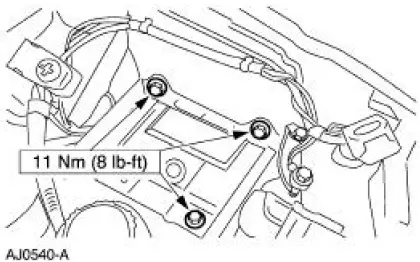
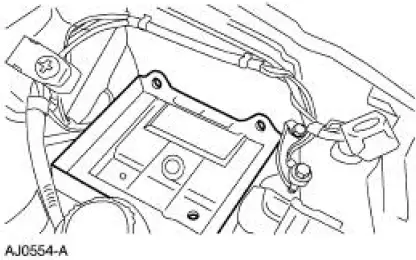
3. Remove the battery tray.
4. NOTE: When the battery is disconnected and reconnected, some abnormal drive symptoms may occur while the vehicle relearns its adaptive strategy. The vehicle needs to be driven to relearn the strategy.
To install, reverse the removal procedure.
 Battery (Removal and Installation)
Removal and Installation
WARNING: Batteries normally produce explosive gases which can
cause personal injury.
Therefore, do not allow flames, sparks or lighted substances to come
near the b ...
 Battery Cables
Removal
WARNING: Batteries normally produce explosive gases which can
cause personal injury.
Therefore, do not allow flames, sparks or lighted substances to come
near the battery. When
ch ...
Other materials:
Accelerator Cable Bracket - 4.6L (2V)
Removal and Installation
1. Disconnect the speed control cable from the throttle body and the bracket.
For additional
information, refer to Section.
2. Disconnect the accelerator cable from the throttle body by rotating the
throttle body full open
and align ...
Cylinder Heads (Installation)
Special Tool(s)
Installer, Crankshaft Vibration
Damper
303-102 (T74P-6316-B)
Installer, Front Cover Oil Seal
303-335 (T88T-6701-A)
Holding Tool, Crankshaft
303-448 (T93P-6303-A)
Spreader Bar
303-D089 (D9 ...
Trim Panel - Quarter, Coupe
Removal and Installation
1. Remove the upper quarter trim panel. For additional information,
refer to Trim Panel-Upper
Quarter in this section.
2. Remove the scuff plate.
3. Remove the pin-type retainers.
4. Lower the rear seat backrests.
5. Rem ...
