
Ford Mustang (1999-2004) Service Manual: Generator - 4.6L 2V
Removal and Installation
1. Disconnect the battery (10655). For additional information, refer to Section.
2. Relieve the accessory drive belt (8620) tension and remove the belt from the generator pulley.
Leave the belt in place for reinstallation. For additional information, refer to Section.
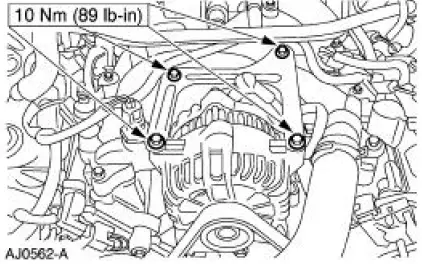
3. Remove the bolts on the upper generator bracket and remove the bracket.
4. CAUTION: This is a new style connector that has a press-to-release tab. Pulling on the tab could result in damage to the connector or harness.
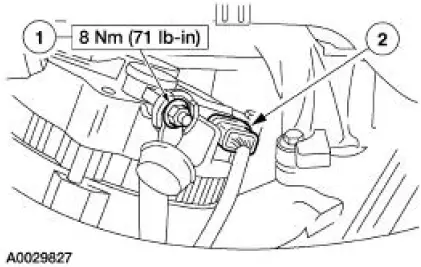
Disconnect the generator electrical connections.
1. Remove the battery positive cable nut (1) and cable.
2. Disconnect the generator electrical connector.
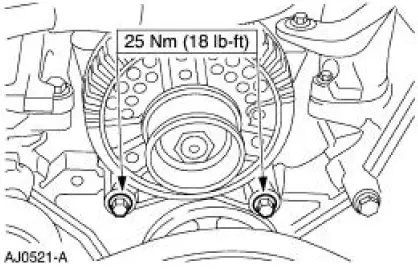
5. Remove the lower generator bolts and remove the generator.
6. To install, reverse the removal procedure.
 Generator - 3.8L
Removal and Installation
1. Disconnect the battery (10655). For additional information, refer
to Section.
2. Relieve the accessory drive belt (8620) tension and remove the belt
from the gen ...
 Generator - 4.6L 4V
Removal and Installation
1. Disconnect the battery. For additional information, refer to
Section.
2. Relieve the accessory drive belt tension and remove the belt from the
generator pulley.
...
Other materials:
Front Seat Backrest
Disassembly and Assembly
All vehicles
1. Remove the front seat backrest. For additional information, refer to
Front Seat Backrest in this
section.
2. Remove the front seat backrest head restraint (611A08).
3. Remove the screws and the safety belt guid ...
Installation
1. CAUTION: Do not use metal scrapers, wire brushes, power abrasive
discs or other
abrasive means to clean the sealing surfaces. These tools cause scratches and
gouges
which make leak paths. Use a plastic scraping tool to remove all traces of old
sealant.
...
Transmission (Installation)
Material
Item
Specification
DEXRON III (ATF)
Transmission Fluid
XT-2-QDX or equivalent
DEXRON III
Pipe Sealant with Teflon
D8AZ-19554-A or equivalent
WSK-M2G350-
A2
Premium Long Life Grease
XG-1-C, K or T or equivalent
...
