
Ford Mustang (1999-2004) Service Manual: Generator - 3.8L
Removal and Installation
1. Disconnect the battery (10655). For additional information, refer to Section.
2. Relieve the accessory drive belt (8620) tension and remove the belt from the generator pulley.
Leave the belt in place for reinstallation. For additional information, refer to Section.
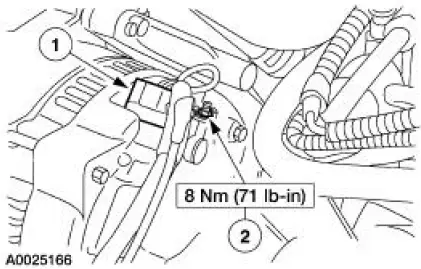
3. CAUTION: This is a new style connector that has a press-to-release tab. Pulling on the tab could result in damage to the connector or harness.
Disconnect the generator (10300).
1. Disconnect the generator electrical connectors.
2. Remove the battery positive cable nut.
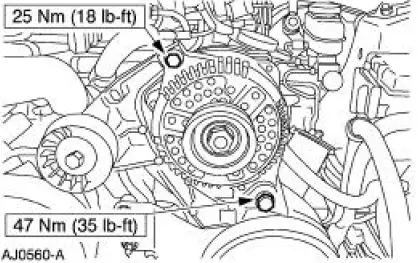
4. Remove the generator.
- Remove the upper and lower generator bolts.
5. To install, reverse the removal procedure.
 Generator and Regulator
General Specifications
Torque Specifications
Generator
The charging system consists of the:
generator (GEN)
internal voltage regulator
The generator has an internal voltage regulato ...
 Generator - 4.6L 2V
Removal and Installation
1. Disconnect the battery (10655). For additional information, refer
to Section.
2. Relieve the accessory drive belt (8620) tension and remove the belt
from the gen ...
Other materials:
Lamp Switch - Headlamp
Removal
1. Disconnect the battery ground cable.
2. Remove the headlamp switch knob.
1. Pull the headlamp switch knob out.
2. Insert a thin tool into the slot, pull and remove the headlamp switch
knob.
3. Remove the instrument panel cluster fin ...
Removal
NOTE: The convertible top hydraulic components are removed from the vehicle
as an assembly. The
hydraulic components are individually repaired and the system must be bled
before being installed into
the vehicle.
Hydraulic system
1. Unlatch the convertible to ...
Front Seat Backrest
Removal and Installation
All vehicles
1. Remove the seat. For additional information, refer to Seat-Front Power
in this section.
2. Remove the front seat backrest latch. For additional information, refer
to Latch-Front Seat
Backrest in this section.
...
