
Ford Mustang (2005-2014) Owners Manual: Information messages
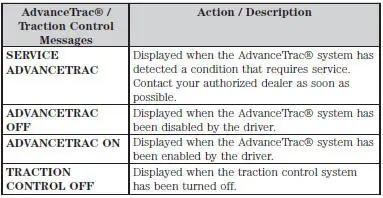
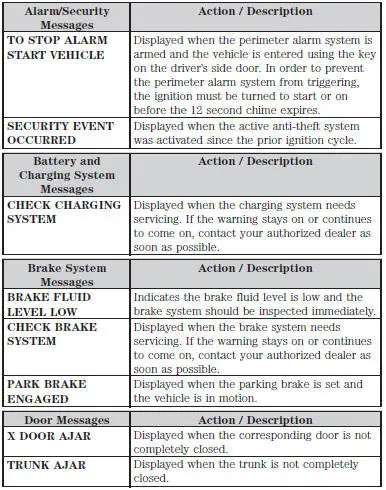
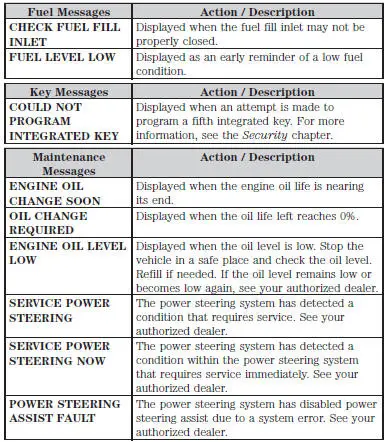
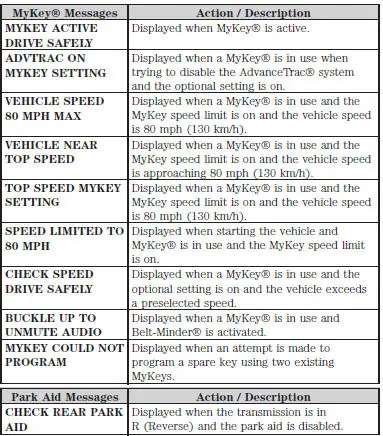
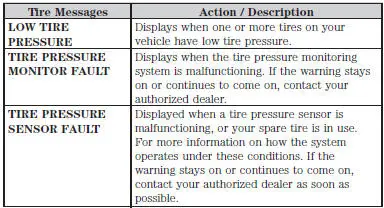
Note: Depending on the vehicle options equipped with your vehicle, not all of the messages will display or be available. Certain messages may be abbreviated or shortened depending upon which cluster type you have.
Press the RESET button for Type 1 displays or the OK button for Type 2 displays to acknowledge and remove some messages from the information display. Other messages will be removed automatically after a short time. Certain messages need to be confirmed before you can access the menus.
 General information
WARNING: Driving while distracted can result in loss of vehicle
control, accident and injury. Ford strongly recommends that drivers
use extreme caution when using any device or feature that may take t ...
 Electronic compass
The compass heading displays in the center-integrated display.
Note: Driving near large buildings, bridges, power lines and powerful
broadcast antenna may affect the compass reading. Magnetic or meta ...
Other materials:
Removal
CAUTION: Suspension fasteners are critical parts because they affect
performance of vital
components and systems and their failure can result in major service expense. A
new part with
the same part number must be installed if installation becomes necessary. ...
Exceptions To Normal Schedule
Yellow Coolant
Change coolant at 5 years or 160,000 km (100,000 miles) of the vehicle's
life, whichever comes
first.
After the initial change, change coolant every 3 years or 80,000 km
(50,000 miles) thereafter.
Natural Gas and Propane Vehicles
Insp ...
Fluid Pan, Gasket and Filter
Material
Item
Specification
MERCON V Automatic
Transmission Fluid
XT-5-QM, XT-5-DM
MERCON V
1. Normal maintenance requires periodic automatic transmission fluid changes.
If a major repair,
such as a clutch, band, bearing, etc., is requir ...
