
Ford Mustang (1999-2004) Service Manual: Inspection and Verification
1. Verify the customer concern by operating the wiper/washer system.
2. Visually inspect for obvious signs of mechanical and electrical damage.
Visual Inspection Chart
| Mechanical | Electrical |
|
|
3. If the concern remains after the inspection, connect the diagnostic tool to the data link connector (DLC) located beneath the instrument panel and select the vehicle to be tested from the diagnostic tool menu. If diagnostic tool does not communicate with the vehicle:
- Check that the program card is correctly installed.
- Check the connections to the vehicle.
- Check the ignition switch position.
4. If diagnostic tool still does not communicate with the vehicle, refer to the diagnostic tool manual.
5. Carry out the DATA LINK DIAGNOSTIC TEST. If diagnostic tool responds with:
- CKT914, CKT915 or CKT70 = ALL ECUS NO RESP/NOT EQUIP, refer to Section.
- NO RESPONSE/NOT EQUIPPED for GEM, go to Pinpoint Test A.
- SYSTEM PASSED, retrieve and record the continuous diagnostic trouble codes (DTCs), erase the continuous DTCs and carry out self-test diagnostics for the GEM.
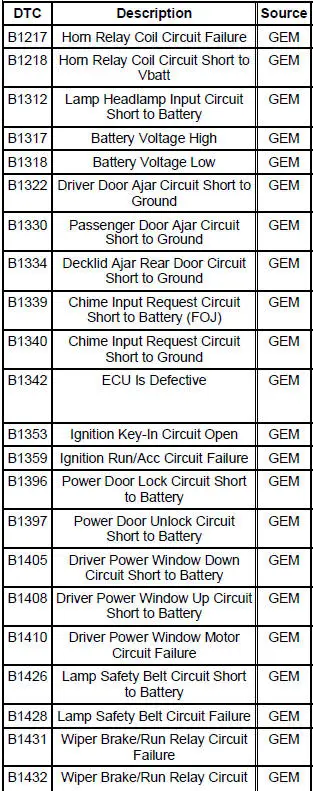
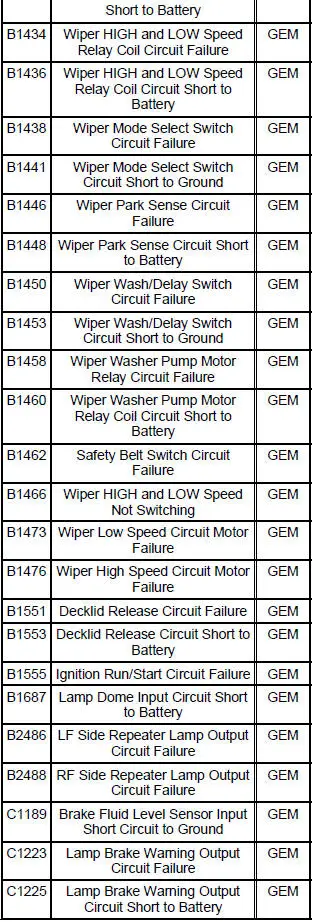
6. If the DTCs retrieved are related to the concern, go to GEM Diagnostic Trouble Code (DTC) Index to continue diagnostics.
7. If no DTCs related to the concern are retrieved, proceed to Symptom Chart to continue diagnostics.
GEM Diagnostic Trouble Code (DTC) Index
Symptom Chart
| Condition | Possible Sources | Action |
|
|
|
|
|
|
|
|
|
|
|
|
|
|
|
|
|
|
|
|
|
 Principles of Operation
Multifunction Wipers
The front wiper/washer feature controls the speed of the front
windshield wipers and the amount of
washer fluid sprayed on the front windshield when requested by the
cus ...
 Pinpoint Tests
CAUTION: Before removing and installing the GEM or its connectors,
disconnect the
battery. Failure to follow this caution will result in the GEM storing many
erroneous DTCs and it
may exhibit errati ...
Other materials:
Pinpoint Tests
CAUTION: Be careful when probing the CJB, battery junction box (BJB)
or any
connectors. Damage will result to the connector receptacle if the probe or
terminal being used
is too large.
CAUTION: Electronic modules are sensitive to static electrical char ...
Front Seat Backrest
Removal and Installation
All vehicles
1. Remove the seat. For additional information, refer to Seat-Front Power
in this section.
2. Remove the front seat backrest latch. For additional information, refer
to Latch-Front Seat
Backrest in this section.
...
Inspection and Repair After a Supplemental Restraint
System (SRS) Deployment
WARNING: If the supplemental restraint system (SRS) is being serviced,
the system must
be deactivated and restraint system diagnostic tools must be installed. Refer to
Air Bag
Supplemental Restraint System (SRS) in this section.
The air bag restraint system ...
