
Ford Mustang (1999-2004) Service Manual: Lamp Switch - Headlamp
Removal
1. Disconnect the battery ground cable.
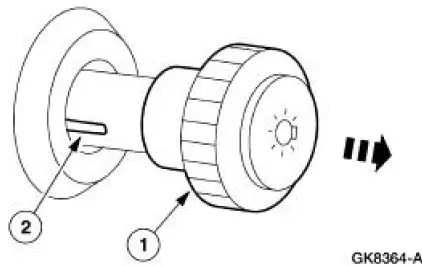
2. Remove the headlamp switch knob.
1. Pull the headlamp switch knob out.
2. Insert a thin tool into the slot, pull and remove the headlamp switch knob.
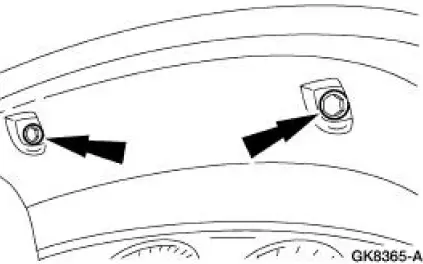
3. Remove the instrument panel cluster finish panel.
- Remove the screws and remove the finish panel.
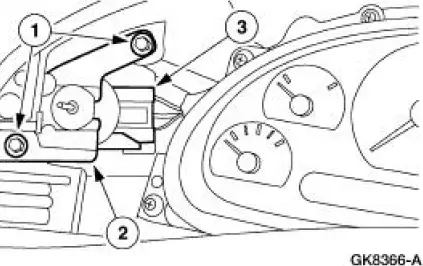
4. Remove the headlamp switch.
1. Remove the screws.
2. Remove the switch.
3. Disconnect the electrical connectors.
Installation
1. NOTE: When the battery is disconnected and reconnected, some abnormal drive symptoms may occur while the vehicle relearns its adaptive strategy. The vehicle may need to be driven 16 km (10 mi) or more to relearn the strategy.
To install, reverse the removal procedure.
 Lamp Assembly - Rear
Removal
1. Position the luggage compartment trim aside.
Remove the two retainers.
2. Remove the four rear lamp nuts.
3. Remove the rear lamp assembly, disconnect the electrical connectors an ...
 Lamp Switch - Brake Pedal Position (BPP)
Removal
1. Disconnect the battery ground cable.
2. Remove the brake pedal position (BPP) switch.
1. Remove the clip.
2. Remove the retainer.
3. Disconnect the electrical connector.
4. ...
Other materials:
Removal
CAUTION: Since the engine is not free-wheeling, timing procedures must
be followed
exactly or piston and valve damage can occur.
1. Remove the engine front cover. For additional information, refer to Engine
Front Cover in this
section.
2. Remove the cranksh ...
Exhaust Gas Recirculation (EGR) Valve - Cobra
Removal and Installation
1. Disconnect the accelerator cable and the speed control cable.
2. Remove the accelerator cable bracket bolts.
3. Release the clip and position the accelerator cable bracket and the cables
aside.
4. Disconnect the electrical c ...
Input Shaft and Bearing
Special Tool(s)
Input Shaft Seal Replacer
308-220 (T94P-7025-AH)
Pinion Bearing Cone Remover
205-D002 (D79L-4621-A) or
Equivalent
Disassembly
1. Using the special tool and a press, remove the input bearing (7025).
2. Remove t ...
