
Ford Mustang (1999-2004) Service Manual: Evaporative Emission Test Port
Removal and Installation
1. Disconnect the pin-type retainer.
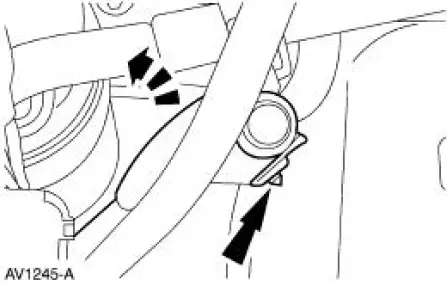
2. Raise and support the vehicle. For additional information, refer to Section.
3. Remove the RH front wheel. For additional information, refer to Section.
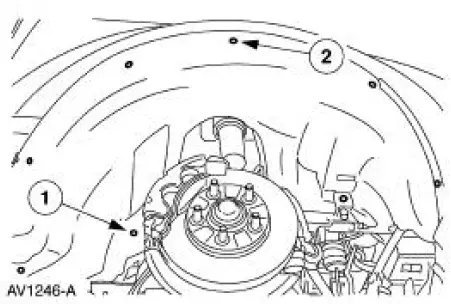
4. Remove the RH front splash shield.
1. Remove the three screws.
2. Remove the five pin-type retainers.
5. Remove the evaporative emission test port by disconnecting at the EVAP canister purge outlet tube junction.
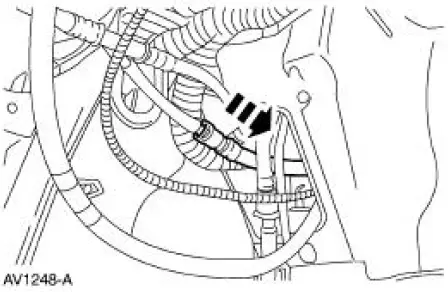
6. To install, reverse the removal procedure.
- Leak test the system. For additional information, refer to Evaporative Emission System Leak Test in this section.
- Carry out the evaporative emission repair verification drive cycle. For additional information, refer to Evaporative Emission Repair Verification Drive Cycle in this section.
Evaporative Emission Canister Vent Solenoid
Removal and Installation
1. Remove the canister vent solenoid. For additional information, refer to Evaporative Emission Canister in this section.
 Fuel Vapor Control Tube Assembly Valve
Removal and Installation
1. Remove the fuel tank. For additional information, refer to
Section.
2. Remove the retainers.
3. NOTE: The fuel vapor vent valve, fuel vapor control valve and the ...
 Electronic Engine Controls
General Specifications
Torque Specifications
...
Other materials:
Halfshaft
Special Tool(s)
Differential Plug
205-294 (T89P-4850-B)
Differential Seal Protector
205-461
Front Hub Remover
205-D070 (D93P-1175-B) or
Equivalent
Halfshaft Removal Tool
205-475
Steering Arm Remover
211-0 ...
Contaminated Refrigerant Handling
1. CAUTION: If contaminated refrigerant is detected, DO NOT recover the
refrigerant
into your recovery/recycling equipment.
Recover the contaminated refrigerant using suitable recovery-only equipment
designed for
capturing and storing contaminated refrigeran ...
Fuel Pump Module
Removal and Installation
1. Remove the fuel tank. For additional information, refer to Fuel Tank in
this section.
2. NOTE: For installation, tighten the bolts in the sequence shown.
Remove the module assembly flange bolts.
3. Clean the area around the fue ...
