
Ford Mustang (1999-2004) Service Manual: Accelerator Cable - 3.8L
Removal and Installation
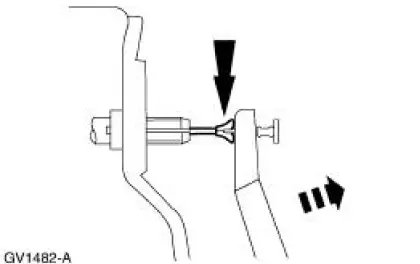
1. Push the accelerator cable nylon bushing out of the accelerator pedal and shaft arm.
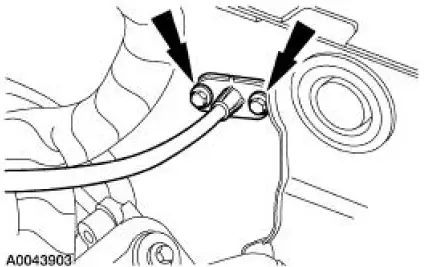
2. Remove the bolts retaining the accelerator cable to the dash panel.
3. Disconnect the accelerator cable from the throttle body by rotating the throttle body full open and aligning the cable with the release slot.
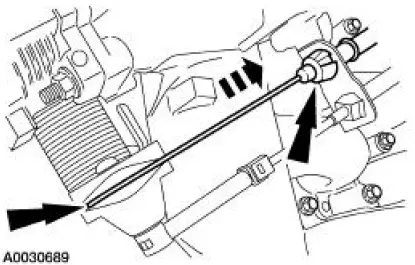
4. Disconnect the accelerator cable from the retaining bracket by compressing the locking tabs and back-feeding the cable through the bracket and out of the engine compartment.
5. To install, reverse the removal procedure.
 Accelerator Pedal and Shaft
Removal and Installation
1. Push the accelerator cable nylon bushing out of the accelerator pedal and
shaft arm.
2. Remove the accelerator pedal and shaft.
Remove the nuts.
Remove the accelerato ...
 Accelerator Cable - 4.6L (2V)
Removal and Installation
1. Push the accelerator cable nylon bushing out of the accelerator pedal and
shaft arm.
2. Remove the bolts retaining the accelerator cable to the dash panel.
3. Disconne ...
Other materials:
Manual Control Lever Shaft and Seal
Special Tool(s)
Installer, Shift Shaft Fluid Seal
307-050 (T74P-77498-A)
Alignment Gauge, TR Sensor
307-351 (T97L-70010-A)
Removal
1. Drain the transmission fluid and remove the fluid pan and filter. For
additional information, ...
Assembly
1. CAUTION: 118 ml (4 oz) of the specified Ford Friction Modifier must
be used in the
axle.
Lubricate each steel clutch plate and soak all friction plates for no less than
15 minutes.
Use Additive Friction Modifier C8AZ-19B546-A or equivalent meeting Ford ...
Connecting Rod - Side Clearance
1. Measure the clearance between the connecting rod and the crankshaft.
Verify the measurement
is within specification.
Refer to the appropriate section in Group for the procedure.
If out of specification, install new components as necessary. Refer
...
