
Ford Mustang (1999-2004) Service Manual: Cable - Antenna Lead In
Removal
1. Remove the audio unit. Refer to Section.
2. Lower the glove compartment by releasing the stops from the instrument panel.
3. Disconnect the antenna in-line connector.
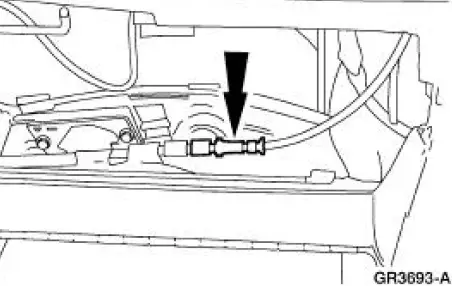
4. Remove the antenna lead in cable.
1. Disconnect the pin-type retainers.
2. Remove the antenna lead in cable.
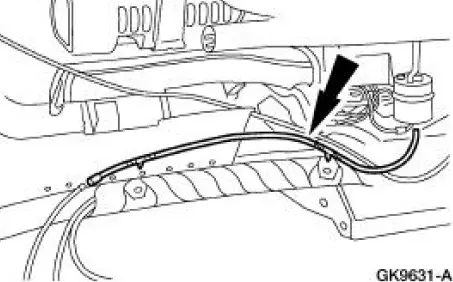
Installation
1. To install, reverse the removal procedure.
 Antenna (Removal and Installation)
Removal
1. Lower the glove compartment by releasing the stops from the
instrument panel.
2. Disconnect the antenna in-line connector
3. Remove the antenna base and cable.
1. Remove the ...
 Speakers
Torque Specifications
Speakers
NOTE: Premium sound speakers (18808) are labeled with either 6
OHMS or 8 OHMS.
The coupe has a four-speaker system, with two door-mounted
speakers and tw ...
Other materials:
Mass Air Flow (MAF) Sensor - Cobra
Removal and Installation
1. Disconnect the intake air temperature (IAT) sensor.
2. Disconnect the breather hose.
3. Disconnect the vacuum hose.
4. Loosen the clamps and remove the air cleaner outlet pipe.
5. CAUTION: The mass air flow (MAF) sensor ho ...
Pinpoint Tests
PINPOINT TEST A: NO COMMUNICATION WITH THE INSTRUMENT
CLUSTER
Test Step
Result / Action to Take
A1 CHECK THE BATTERY POWER SUPPLY TO THE INSTRUMENT
CLUSTER
YesGO to A2 .
No
REPAIR the circuit.
TEST the system
for normal
operation.
...
Door Speaker - Upper
Removal and Installation
1. Remove the front door trim panels (239420). For additional
information, refer to Section
2. Remove the upper speaker access cover.
3. Remove the upper speaker housing.
1. Remove the screw.
2. Remove the upper spea ...
