
Ford Mustang (1999-2004) Service Manual: Mass Air Flow (MAF) Sensor - 4.6L (2V)
Removal
CAUTION: The mass air flow (MAF) sensor hot wire sensing element and housing are calibrated as a unit and must be repaired as a complete assembly. Do not damage the sensing element (internal to housing) or possible failure to the mass air flow sensor may occur
1. Disconnect the battery ground cable. For additional information, refer to Section.
2. Remove the air cleaner outlet tube. For additional information, refer to Section.
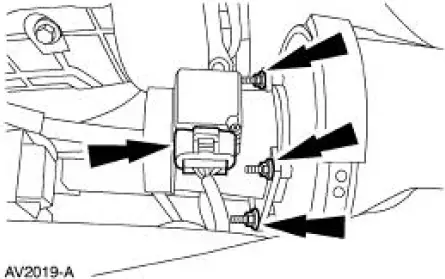
3. Remove the mass air flow sensor (MAF).
- Disconnect the connector.
- Remove the four nuts and the MAF sensor.
Installation
1. To install, reverse the removal procedure.
 Mass Air Flow (MAF) Sensor - 3.8L
Removal
CAUTION: The mass air flow (MAF) sensor hot wire sensing
element and housing are
calibrated as a unit and must be repaired as a complete assembly. Do not
damage the sensing
element ...
 Mass Air Flow (MAF) Sensor - Cobra
Removal and Installation
1. Disconnect the intake air temperature (IAT) sensor.
2. Disconnect the breather hose.
3. Disconnect the vacuum hose.
4. Loosen the clamps and remove the air cleaner ...
Other materials:
Suction Accumulator
Material
Item
Specification
PAG Refrigerant Compressor
Oil (R-134a Systems)
F7AZ-19589-DA (Motorcraft YN-
12-C)
WSH-M1C231-
B
Removal and Installation
1. Recover the refrigerant. For additional information, refer to Section.
2. Disco ...
Symptom Chart
Condition
Possible Sources
Action
Hard Steering or
Lack of Assist
Seized lower steering
column shaft U-joints.
Damaged, fractured
steering column
bearing(s).
Power steering pump.
Suspension
components.
...
Safety Belt Buckle - Rear Seat
Removal
1. Remove the rear seat cushion.
2. Remove the bolt and the safety belt buckle.
Installation
1. NOTE: LH and RH rear seat safety belt buckles have different anchor
plates. Make sure correct
part is used when installing buckle and anchor plate in th ...
