
Ford Mustang (1999-2004) Service Manual: Parking, Rear and License Lamps
Refer to Wiring Diagrams Cell 92 , Exterior for schematic and connector information.
Special Tool(s)
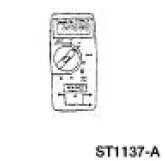 |
73 III Automotive Meter or equivalent 105-R0057 |
Inspection and Verification
1. Verify the customer concern by operating the parking lamps.
2. Visually inspect for the following obvious signs of mechanical and electrical damage.
Visual Inspection Chart
| Mechanical |
Electrical |
|
|
3. If the concern is not visually evident, determine the symptom and proceed to Symptom Chart.
Symptom Chart
| Condition | Possible Sources | Action |
|
|
|
|
|
|
|
|
|
Pinpoint Tests
PINPOINT TEST L: THE PARKING, REAR OR LICENSE LAMPS ARE INOPERATIVE
| Test Step | Result / Action to Take |
| L1 CHECK THE VOLTAGE TO THE HEADLAMP SWITCH | Yes GO to L2 . No REPAIR the circuit. TEST the system for normal operation. |
|
|
| L2 CHECK CIRCUIT 14 (BN) FOR OPEN | Yes INSTALL a new headlamp switch; REFER to Lamp Switch-Headlamp . TEST the system for normal operation. No REPAIR the circuit. TEST the system for normal operation. |
|
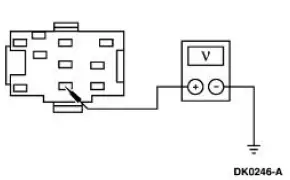
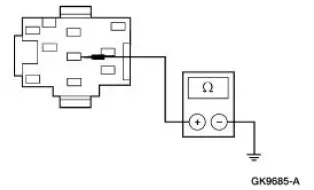
PINPOINT TEST M: ONE OR MORE PARKING, REAR OR LICENSE LAMP(S) IS INOPERATIVE
| Test Step | Result / Action to Take |
| M1 CHECK THE VOLTAGE TO THE INOPERATIVE LAMP(S) | Yes REPAIR Circuit 1205 (BK) for an open. TEST the system for normal operation. No REPAIR the circuit. TEST the system for normal operation |
|
PINPOINT TEST N: THE PARKING, REAR OR LICENSE LAMPS ARE ON CONTINUOUSLY
| Test Step | Result / Action to Take |
| N1 CHECK THE HEADLAMP SWITCH | Yes REPAIR Circuit 14 (BN) for a short to battery. TEST the system for normal operation. No INSTALL a new headlamp switch; REFER to Lamp Switch-Headlamp . TEST the system for normal operation |
|
 Turn Signal and Hazard Lamps
Refer to Wiring Diagrams Cell 90 , Turn/Stop/Hazard Lamps for schematic
and connector information.
Special Tool(s)
73 III Automotive Meter
105-R0057 or equivalent
Inspection and Ver ...
 Fog Lamps
Refer to Wiring Diagrams Cell 86 , Fog Lamps for schematic and connector
information.
Special Tool(s)
73 III Automotive Meter or
equivalent
105-R0057
Principles of Operation
The f ...
Other materials:
HomeLink® wireless control system
WARNING: Make sure that the garage door and security device
are free from obstruction when you are programming. Do not
program the system with the vehicle in the garage.
WARNING: Do not use the system with any garage door opener
that does not have the safety s ...
Warning lamps and indicators
These indicators can alert you to a vehicle condition that may become
serious enough to cause expensive repairs. Many lights will illuminate
when you start your vehicle to make sure they work. If any light remains
on after starting the vehicle, refer to the re ...
Final assembly
23. Install the differential assembly in the differential housing. For
additional information, refer to
Differential Case in this section.
24. CAUTION: Align the index marks.
CAUTION: Install the driveshaft with new bolts. If new bolts are not available,
a ...
