
Ford Mustang (1999-2004) Service Manual: Disassembly
1. Remove the driveshaft (4602). For additional information, refer to Driveshaft in this section.
2. CAUTION: Under no circumstances is the driveshaft assembly to be clamped in the jaws of a vise or similar holding fixture. Denting or localizing fracture can result, causing driveshaft failure during vehicle operation.
Place the driveshaft on a suitable workbench, being careful not to damage the tube.
3. NOTE: If components are not marked and installed correctly, driveline imbalance can occur.
Index-mark the positions of the driveshaft components.
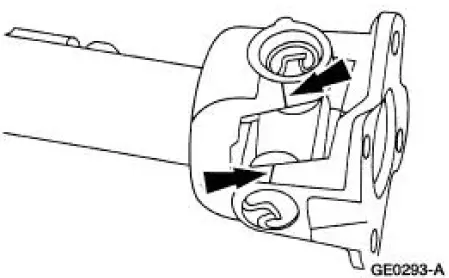
4. Clamp the U-joint tool in a vise.
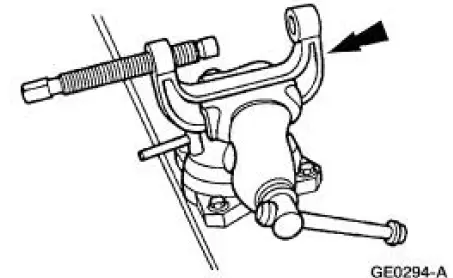
5. Remove all four of the snap rings.
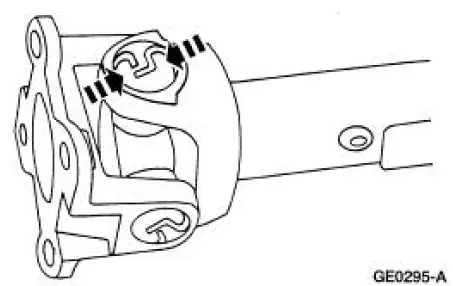
6. Remove the driveshaft flange yoke.
1. Position the driveshaft flange yoke in the U-joint tool.
2. Press out a bearing cup.
3. Remove the driveshaft flange yoke.
4. Press on the spider to remove the remaining bearing cup.
5. Remove the driveshaft flange yoke.
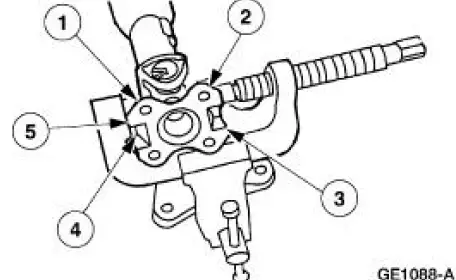
7. Remove the spider.
1. Reposition the driveshaft in the U-joint tool.
2. Press out the bearing cup.
3. Rotate the driveshaft.
4. Press on the spider to remove the remaining bearing cup.
5. Remove the spider.
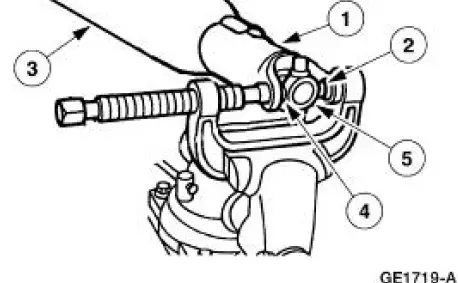
8. Clean the yoke area at the end of the driveshaft.
 Universal Joint - Single Cardan, Flange Yoke
Special Tool(s)
Installer/Remover, C Frame
and Screw
205-086 (T74P-4635-C)
...
 Assembly
1. NOTE: Universal joint kits are to be installed as complete
assemblies only. Do not mix
components from other U-joint kits.
Install the spider.
1. Start a new bearing cup into the driveshaft yok ...
Other materials:
Principles of operation
MyKey allows you to program keys with restricted driving modes to
promote good driving habits. You can use all but one of the keys
programmed to your vehicle with these restricted modes.
Any keys that have not been programmed are referred to as
administrator ...
Lifting
CAUTION: Do not allow the lift adapters to contact the steering
linkage, suspension arms,
stabilizer arms, or to compress the lower suspension arm stabilizer bar
insulator (5493).
Damage to the suspension, exhaust and steering linkage components may occur i ...
Seat Track
Removal and Installation
1. Remove the front seat. For additional information, refer to Seat-Front
Power in this section.
2. Remove the outboard seat trim shield.
3. Disconnect the electrical connector.
4. Remove the seat track bolts.
5. To install, ...
