
Ford Mustang (1999-2004) Service Manual: Horn (Diagnosis and Testing)
Refer to Wiring Diagrams Cell 44 , Horns/Cigar Lighter for schematic and connector information.
Special Tool(s)
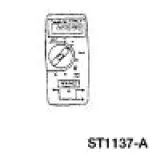 |
73 Digital Multimeter or equivalent 105-R0051 |
Inspection and Verification
1. Verify the customer concern by operating the horn (13832).
2. Visually inspect for obvious signs of mechanical and electrical damage.
Visual Inspection Chart
| Mechanical | Electrical |
|
|
3. If fault is not visually evident, determine the symptom and proceed to Symptom Chart.
Symptom Chart
| Condition | Possible Sources | Action |
|
|
|
|
|
|
Pinpoint Tests
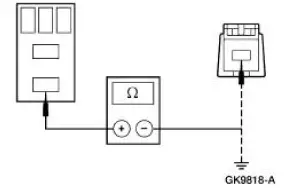
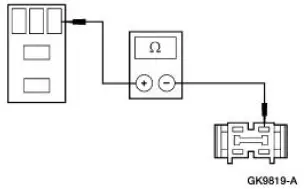
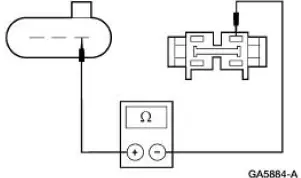
PINPOINT TEST A: THE HORN DOES NOT SOUND
| Test Step | Result / Action to Take |
| A1 CHECK POWER SUPPLY TO HORN RELAY | Yes GO to A2 . No REPAIR the circuit in question. TEST the system for normal operation. |
|
|
| A2 CHECK HORN RELAY | Yes GO to A3 . No INSTALL a new horn relay. TEST the system for normal operation. |
|
|
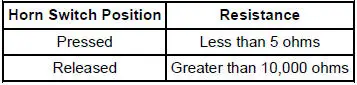
| A3 CHECK HORN SWITCH SIGNAL TO HORN RELAY | Yes GO to A4 . No GO to A5 . |
Horn Switch Position
|
|
| A4 CHECK WIRE BETWEEN HORN RELAY AND HORN | Yes INSTALL new horns. TEST the system for normal operation. No REPAIR the circuit. TEST the system for normal operation. |
|
|
| A5 CHECK WIRE BETWEEN HORN RELAY AND AIR BAG SLIDING CONTACT | Yes GO to A6 . No REPAIR the circuit. TEST the system for normal operation. |
|
|
| A6 CHECK AIR BAG SLIDING CONTACT | Yes GO to A7 . No INSTALL a new air bag sliding contact. REFER to Section. TEST the system for normal operation. |
|
|
| A7 CHECK THE STEERING WHEEL SWITCH HARNESS | Yes INSTALL a new horn switch. REFER to Switch-Horn . TEST the system for normal operation. No INSTALL a new steering wheel switch harness. TEST the system for normal operation. |
|
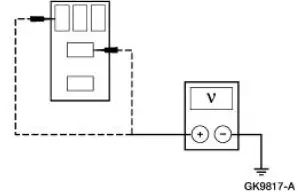
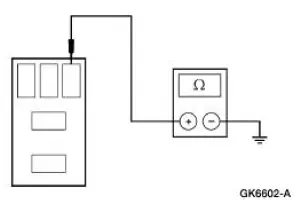
PINPOINT TEST B: THE HORN SOUNDS CONTINUOUSLY
| Test Step | Result / Action to Take |
| B1 CHECK HORN CIRCUIT 1 (DB) | Yes REPAIR Circuit 1 (DB) for short to battery. TEST the system for normal operation. No GO to B2 . |
|
|
| B2 CHECK HORN RELAY | Yes REINSTALL the horn relay. GO to B3 . No INSTALL a new horn relay. TEST the system for normal operation. |
|
|
| B3 CHECK CIRCUIT 6 (YE/LG) | Yes GO to B4 . No RECONNECT the air bag sliding contact. GO to B5 . |
|
|
| B4 CHECK GEM INPUT | Yes REPAIR Circuit 6 (YE/LG). TEST the system for normal operation. No INSTALL a new GEM; REFER to Section. TEST the system for normal operation. |
|
|
| B5 CHECK THE AIR BAG SLIDING CONTACT | Yes INSTALL a new air bag sliding contact. REFER to Section. TEST the system for normal operation. No GO to B6 . |
|
|
| B6 CHECK STEERING WHEEL SWITCH HARNESS | Yes INSTALL a new horn switch. REFER to Switch- Horn . TEST the system for normal operation. No INSTALL a new steering wheel switch harness. TEST the system for normal operation. |
|
 Horn
Horn
Torque Specifications
Horn
The horn system consists of the following:
dual horns (one high-pitched, one low-pitched)
horn switch (located underneath the driver side air bag module
[043 ...
 Switch - Horn
Removal
1. Remove the driver side air bag module (043B13). Refer to Section.
2. Remove the switches.
1. Disconnect the horn wire from the switches.
2. Remove the horn switch screws and ...
Other materials:
Crankshaft Position (CKP) Sensor - 3.8L
Removal
1. Disconnect the battery ground cable. For additional information,
refer to Section.
2. Remove the crankshaft position (CKP) sensor.
Disconnect the connector.
Remove the bolts and the sensor.
Installation
1. To install, reverse ...
Using sync with your media player
You can access and play music from your digital music player over
the vehicle’s speaker system using the system’s media menu or voice
commands. You can also sort and play your music by specific categories,
such as artists, albums, etc.
SYNC is capable of ...
Hydraulic Lash Adjusters
Removal
1. Remove the roller followers. For additional information, refer to Roller
Followers in this section.
2. Remove the 16 hydraulic lash adjusters.
3. Inspect the roller followers. For additional information, refer to
Section.
Installation
1. To ins ...
