
Ford Mustang (1999-2004) Service Manual: Installation
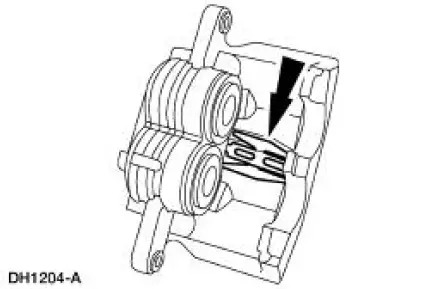
1. Make sure the anti-rattle spring is correctly positioned in the caliper.
2. CAUTION: Make sure guide pin boots are correctly seated or damage to guide pins can occur.
Install the disc brake caliper.
1. Hold the guide pins stationary.
2. Install the caliper bolts.
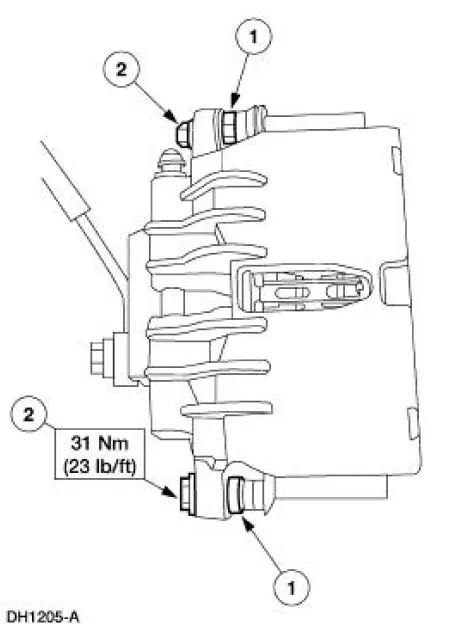
3. NOTE: Use new copper washers.
Install the front brake hose.
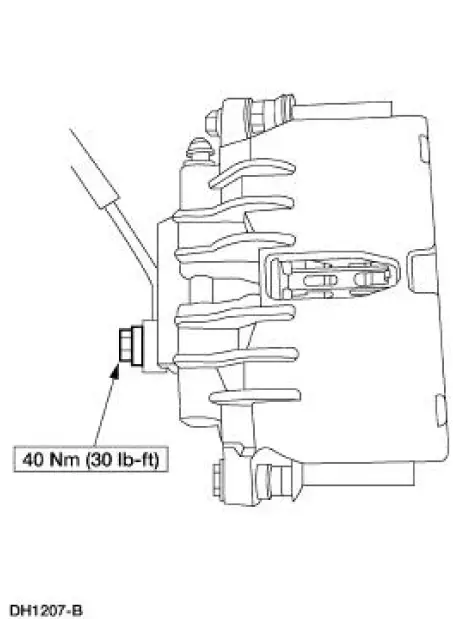
4. Bleed the caliper.
5. Install the wheel and tire assembly.
6. Fill the brake master cylinder reservoir (2K478) with clean High Performance DOT 3 Brake Fluid C6AZ-19542-AB or equivalent DOT 3 fluid meeting Ford specification ESA-M6C25-A. Install brake master cylinder filler cap (2162).
7. Check the brake system operation.
 Removal
1. Raise and support the vehicle.
2. Remove the wheel and tire assembly.
3. WARNING: Brake fluid contains polyglycol ethers and polyglycols.
Avoid contact
with eyes. Wash hands thoroughly ...
 Brake Caliper - Cobra
Removal
1. Raise and support the vehicle.
2. Remove the tire and wheel assembly.
3. Remove the caliper locating pin E-clip.
4. Remove the caliper locating pin.
5. Remove the front brake ...
Other materials:
Principles of Operation
The vehicle has two module communications networks. The standard
corporate protocol (SCP) which
is an unshielded twisted pair cable (data bus plus, Circuit 914 [TN/OG] and
data bus minus, Circuit 915
[PK/LB]), and the international standards organization ...
Piston - Selection
NOTE: The cylinder bore must be within the specifications for
taper and out-of-round before fitting a
piston.
1. Select a piston size based on the cylinder bore.
2. NOTE: For precision fit, new pistons are divided into three
categories within each size ...
Ignition switch
A. Off: The ignition is off.
Note: When you switch the ignition off and leave your vehicle, do not
leave your key in the ignition. This could cause your vehicle battery to
lose charge.
B. Accessory: Allows the electrical accessories such as the radio to
ope ...
