
Ford Mustang (1999-2004) Service Manual: Plenum Chamber
Removal
1. Remove the instrument panel. For additional information, refer to Section.
2. Remove the audio unit. For additional information, refer to Section.
3. If equipped, remove the CD player. For additional information, refer to Section.
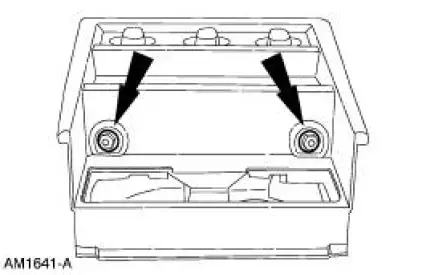
4. Remove the instrument panel center finish panel screws.
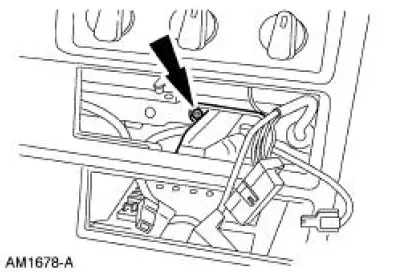
5. Remove the instrument panel center finish panel screw.
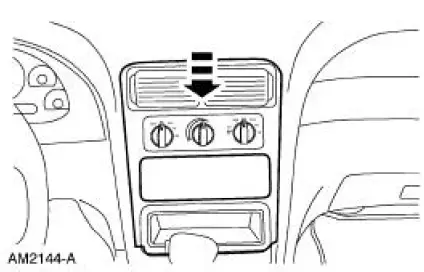
6. Unsnap and remove the instrument panel center finish panel.
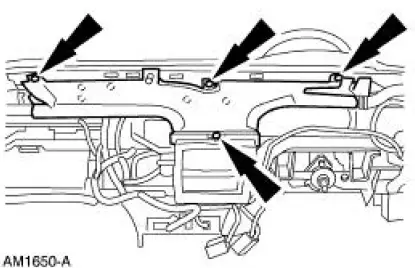
7. Remove the screws and remove the defroster duct.
8. Remove the screw.
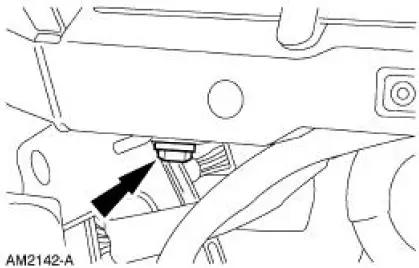
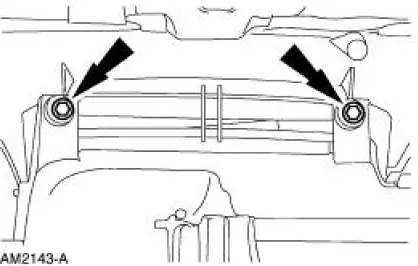
9. Remove the screws and remove the plenum chamber.
Installation
1. To install, reverse the removal procedure.
 Register - LH
Removal
1. Remove the instrument panel steering column cover bolts.
2. Unsnap and remove the instrument panel steering column cover.
3. Remove the bolts and the steering column reinforcement.
4. ...
 Door - Air Inlet Duct
Removal
1. Remove the evaporator core housing. For additional information, refer to
Section.
2. Disconnect the vacuum line.
3. Remove the screws and remove the duct.
Installation
1. To install, ...
Other materials:
Engine block heater
WARNING: Failure to follow engine block heater instructions
could result in property damage or physical injury.
WARNING: Do not use your heater with ungrounded electrical
systems or two-pronged (cheater) adapters. There is a risk of
electrical shock.
Note: The ...
Cooler - Fluid
Removal
1. Raise and support the vehicle.
2. Disconnect the power steering hoses.
3. Remove the bolt and routing bracket.
4. Remove the bolts and the power steering fluid cooler.
Installation
1. To install, reverse the removal procedure.
2. Fill and ...
Pinpoint Test I: LFC 33/DTC B1933 - Passenger Air Bag Circuit Resistance
High
Normal Operation
The restraints control module (RCM) monitors the resistance of the
passenger air bag ignitor by
measuring the resistance between pins 6 and 7. If the RCM detects high
resistance between these
pins, it will store a diagnostic trouble cod ...
