
Ford Mustang (1999-2004) Service Manual: Switch - Deactivator
Removal
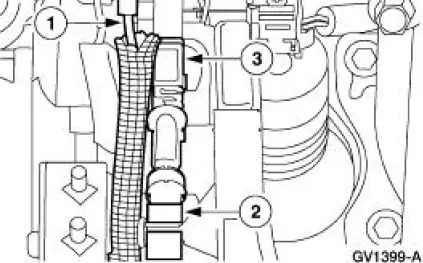
1. Disconnect the battery ground cable.
2. Remove the deactivator switch.
1. Disconnect the deactivator switch electrical connector.
2. Detach the lower deactivator switch hook.
3. Detach the upper deactivator pivot.
Installation
1. NOTE: When the battery is disconnected and reconnected, some abnormal drive symptoms may occur while the vehicle relearns its adaptive strategy. The vehicle may need to be driven 16 km (10 mi) or more to relearn the strategy.
To install, reverse the removal procedure.
- Adjust the deactivator switch, refer to Switch Adjustment-Deactivator
 Actuator - Speed Control Servo
1. CAUTION: Electronic modules are sensitive to static electrical
charges. If exposed
to these charges, damage may result.
Disconnect the battery ground cable.
2. Remove the LH wheel and tire; re ...
 Switch - Speed Control Actuator
Removal
1. Remove the steering wheel; refer to Section.
2. Remove the steering wheel rear cover.
1. Remove the screws.
2. Remove the steering wheel rear cover.
3. Remove the ribbon harne ...
Other materials:
Anti-Lock Control - Rear
Torque Specifications
Anti-Lock Control
The four wheel anti-lock brake system (4WABS) consists of the following
components:
anti-lock brake control module (2C346)
front anti-lock brake sensor (2C205)
front anti-lock brake sensor indicator (2C182)
...
Daytime Running Lamps (DRL) (Diagnosis and Testing)
Refer to Wiring Diagrams Cell 97 , Daytime Running Lamps for schematic
and connector information.
Special Tool(s)
73III Automotive Meter or
equivalent
105-R0057
Principles of Operation
Daytime Running Lamps (DRL)
The daytime running lamp ...
Valve Cover RH
Material
Item
Specification
Metal Surface Cleaner
F4AZ-19A536-RA or equivalent
WSE-M5B392-
A
Silicone Gasket and Sealant
F7AZ-19554-EA or equivalent
WSE-M4G323-
A4
PAG Refrigerant Compressor
Oil
F7AZ-19589-DA (Motorcraf ...
