
Ford Mustang (1999-2004) Service Manual: Wiper Blade and Pivot Arm Adjustment
1. Cycle and park the windshield wipers.
2. Verify that the distance between the center of the RH windshield wiper blade and the top edge of the cowl top vent panel is within specification.
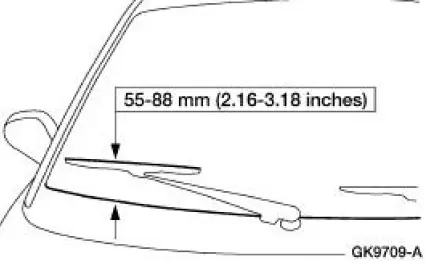
3. Verify that the distance between the center of the LH windshield wiper blade and the top edge of the cowl top vent panel is within specification.
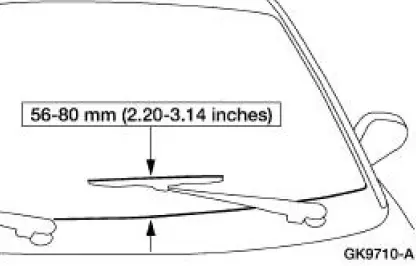
4. If the distance is not within specification, remove the windshield wiper pivot arms and reposition to specification.
Remove the pivot arm.
1. Pull up on the pivot arm.
2. Pull out on the retainer tab and remove the pivot arm.
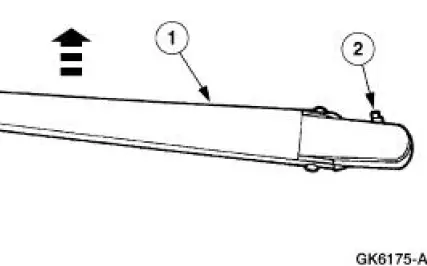
Pivot Arm
Removal
1. NOTE: New windshield wiper pivot arms need to be installed as an assembly.
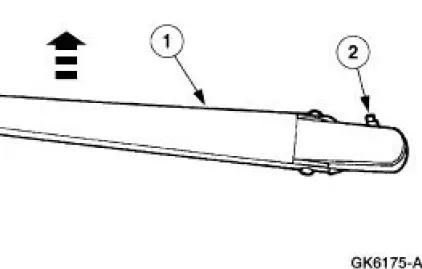
Remove the pivot arm.
1. Pull up on the pivot arm.
2. Pull out on the retainer tab and remove the pivot arm.
Installation
1. To install, reverse the removal procedure.
 Component Test
Windshield Wiper Motor
CAUTION: Do not handle the wiper motor abusively when
diagnosing the wiper
operations. Failure to follow this caution may result in damage to the
motor magnets and wil ...
 Mounting Arm and Pivot Shaft
Removal
1. Park the windshield wipers in the full upright position. This will
allow for easy access to the
retaining clip on the wiper motor output shaft.
2. Remove the cowl top vent panels.
...
Other materials:
Negative and Positive Camber
Camber is the vertical tilt of the wheel (1007) when viewed from the front.
Camber can be positive or
negative and has a direct effect on tire wear.
Caster
Item
Part Number
Description
1
-
Positive caster
2
-
True vertical
...
Fuel System (Description and Operation)
Component Location
WARNING: Do not smoke or carry lighted tobacco or open flame of any
type when
working on or near any fuel-related components. Highly flammable mixtures are
always present
and may be ignited, resulting in possible personal injury ...
Engine (Removal)
Special Tool(s)
Special Tool(s)
Support Bracket, Engine
303-639
Spreader Bar
303-D089 (D93P-6001-A3)
Lifting Bracket Set, Engine
303-D074 (D91P-6001-A)
Removal
1. Remove the hood.
2. Remove the battery. For additi ...
