
Ford Mustang (1999-2004) Service Manual: Clutch Controls (Description and Operation)
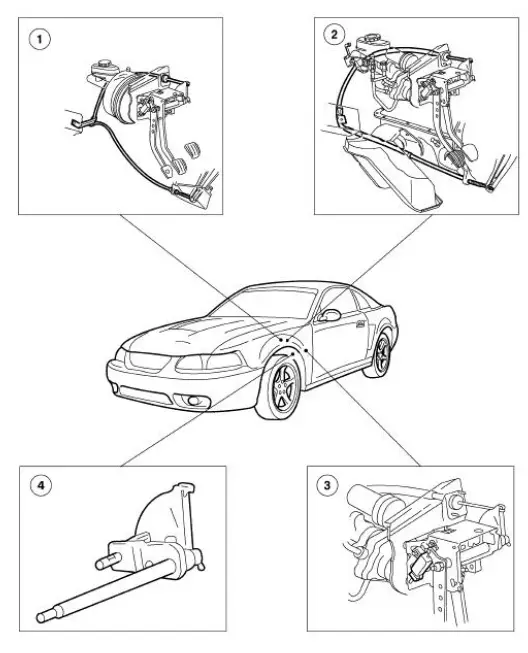
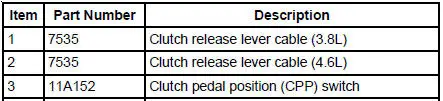

The clutch control system engages and disengages the clutch. The clutch control system disengages the clutch when the clutch pedal is depressed and engages the clutch when the clutch pedal is released. Clutch pedal motion is transmitted by the clutch release lever cable to the clutch release lever. The clutch release hub and bearing engages the clutch pressure plate diaphragm spring, releasing the pressure on the clutch disc which in turn disengages the transmission from the engine.
The clutch adjusts automatically to compensate for clutch disc wear. The clutch linkage is selfadjusting.
The clutch pedal position (CPP) switch prevents the starter motor from engaging unless the clutch pedal is depressed all the way to the floor. The switch plunger is contacted by the clutch pedal and extends as the clutch pedal is pressed. The clutch pedal position switch is electrically connected in line with the ignition switch and the starter motor relay coil. The CPP also turns off the speed control when the clutch pedal is depressed.
 Clutch Controls
General Specifications
Torque Specifications
...
 Clutch Pedal - Quadrant and Pawl Assembly
Removal
1. Disconnect the battery ground cable (14301).
2. Loosen the nut from inside the engine compartment.
3. Loosen the nuts from inside the vehicle.
4. Loosen the screw.
5. Disconnect t ...
Other materials:
Rear seats
Rear Seat Entry and Exit
Use the seatback release to fold the
back of the front seat forward for
rear seat access. This release handle
is located on the upper back of the
front seat. The seatback locks
automatically when returned to the
normal position.
Use ...
Disassembly
1. Inspect the clutch cylinder thrust surfaces, piston bore and clutch plate
serrations for scores or
burrs. Minor scores or burrs may be removed with a crocus cloth. Install a new
clutch cylinder if
badly scored or damaged.
2. Check fluid passage in the cl ...
Supercharger Cooling System Flushing
1. WARNING: Never remove the pressure relief cap while the engine is
operating or
when the cooling system is hot. Failure to follow these instructions can result
in damage
to the cooling system or engine or personal injury. To avoid having scalding hot
cool ...
