
Ford Mustang (1999-2004) Service Manual: Latch - Door
Removal
1. Remove the door trim panel (23942). For additional information, refer to Section.
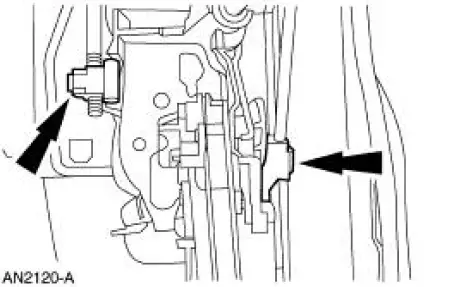
2. Release the actuating rods by opening the clips.
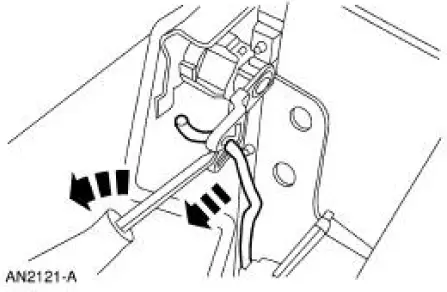
3. Using a screwdriver, release the lock cylinder actuating rod.
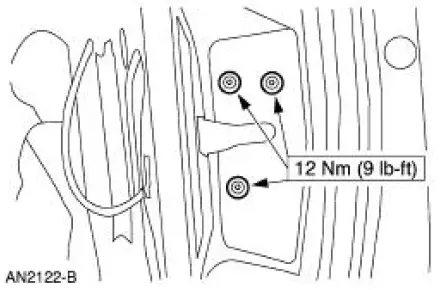
4. Remove the door latch screws.
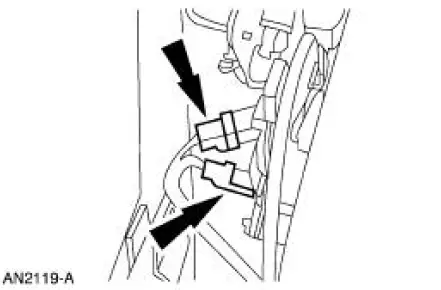
5. Disconnect the door ajar switch and the actuator electrical connectors.
6. Remove the water shield.
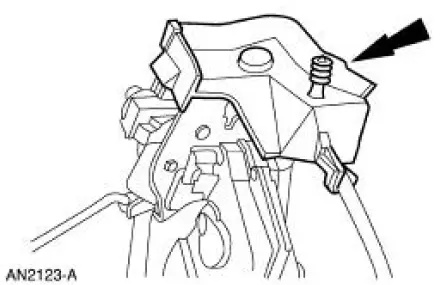
7. Release the interior door handle actuating cable.
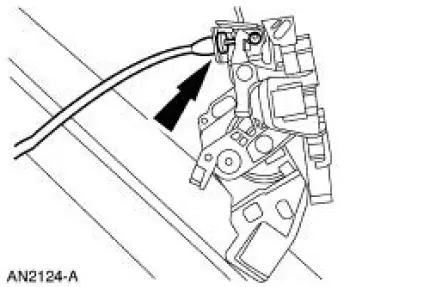
8. Remove the door latch.
Installation
1. To install, reverse the removal procedure.
 Handles, Locks, Latches And Mechanisms (Description and Operation)
Lock Cylinders
Individual lock cylinders are repaired by discarding the inoperative
lock cylinder and building a new
lock cylinder using the appropriate lock repair package. The lock repair
...
 Latch - Luggage Compartment Lid
Removal
1. NOTE: The luggage compartment lid latch is equipped with
mechanical interior release handle.
Disconnect the luggage compartment lid lock actuator (432A38) cable.
2. Remove the lug ...
Other materials:
Retractor - Rear Seat Safety Belt, Coupe
Special Tool(s)
Torx Bit, Safety Belt Bolt
501-010 (T77L-2100-A)
Removal
1. Remove the quarter trim panel (31012) and the angel wing trim. For
additional information, refer
to Section.
2. Using the special tool, remove the D-ring bolt.
3. U ...
Synchronizers
Disassembly
NOTE: This procedure applies to all synchronizer assemblies
(7124). The synchronizers are slightly
different in design. Notation is made where procedural differences occur.
1. On the third/fourth speed synchronizer and the fifth speed
synchr ...
Engine
WARNING: Do not operate the engine with the hood open until the fan
blade has been first
examined for possible cracks and separation.
The 4.6L (4V) (281 CID) is a V-8 engine with the following features:
dual overhead camshafts
four valves per cylinder
s ...
